Wedding Invitation Video Maker
Make a wedding e-invite video to send on WhatsApp. Add the couple's names, the blessing line, your message and every function with its date, time and venue, pick one of 12 animated designs and a tune, and download an MP4. English or Hindi wording, no sign-up and no watermark.
- 100% free
- No sign-up
- Runs in your browser
- Updated November 2026
1Design and language
Switching changes the ready wording only. Anything you typed yourself stays as it is.
2The couple
Your photo goes in an arch window instead of the drawing. It stays on your phone or computer; it is not uploaded or saved.
3Wording
4Functions
Each function gets its own scene with the date, time and venue. Up to 6.
5Family and contact
6Music and video
Our four tunes are real recordings that are free to use (public domain or CC0). If you add your own song, make sure you may use it.
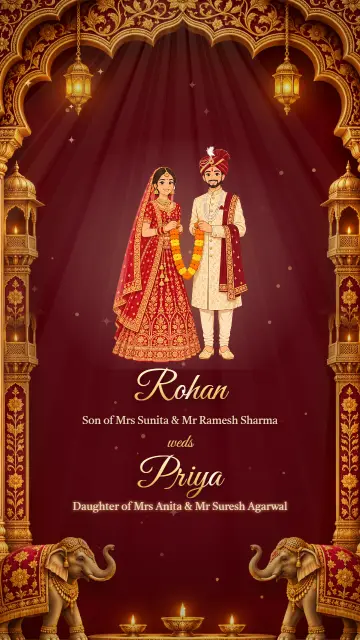
Sample video. Change the names, dates and design and the preview updates.
Making your video…
Check the spelling, dates and venues before you send it. Everything is made in your browser: your details, photo and song are not uploaded.
Quick answer
MuftTools.in's free wedding invitation video maker turns your wedding details into a vertical 9:16 MP4 video of about 30 to 45 seconds. The video opens with a blessing line (with Lord Ganesha if you like), shows the couple with a drawn bride and groom or your own photo, then the invitation message, one scene for each function (haldi, mehendi, sangeet, wedding, reception, nikah and more) with its date, time and venue, and ends with the family names and contact. Choose from 12 animated designs, English or Hindi wording, three built-in tunes or your own song, and 720p or 1080p. The video is made inside your browser, so your details, photo and song are not uploaded.
- Designs
- 12 animated designs: royal palace, marigold haldi, pink peony, starry night, emerald nikah, pastel garden, South temple, lotus pond, ivory & gold, saffron kalash, papercut, clay
- Video
- MP4 (H.264 video, AAC audio), 9:16 vertical, 720 × 1280 or 1080 × 1920, 30 frames a second, about 30-45 seconds
- Scenes
- Blessing and heading, the couple, invitation message, one scene per function (up to 6), family names and RSVP
- Wording
- English or Hindi ready wording, all editable; blessing line choices for Hindu, Muslim, Sikh and Jain families
- Music
- Canon in D, romantic strings, veena or dhol (real recordings, public domain or CC0), your own song, or no music
- Privacy
- Made in your browser; the photo, song and details are not uploaded
How to make a wedding invitation video
- Pick a design and the language. Choose one of the 12 animated designs and tap English or हिंदी. The sample wording changes to the language you pick.
- Add the couple. Type the groom's and bride's names and, if you like, a line for each set of parents, such as "Son of Mrs Sunita & Mr Ramesh Sharma". Choose whose name comes first and the word between the names: weds, & or संग.
- Choose the picture. Pick a drawn bride and groom in lehenga and sherwani, silk saree and veshti, or sharara and sherwani, use your own photo, or leave the picture out.
- Write the wording. Pick a blessing line, turn Lord Ganesha on or off for the opening scene, and edit the heading and the invitation message.
- Add the functions. For each function, fill in the name, date, time and venue. Add up to six, from haldi to the reception.
- Add the family and contact. Write the family names that invite the guests, a closing line and an RSVP number.
- Choose the music and quality, press play to watch the preview, then tap Make MP4 video. The file downloads to your phone or computer, ready to send.
The preview updates as you type, so you can check each scene before you make the video. Long names and messages shrink a little to fit the screen.
What the video shows, scene by scene
An invitation video works like a printed card read one page at a time. The tool puts your details in the order guests expect:
- Blessing and heading: a line such as ॥ श्री गणेशाय नमः ॥, Bismillahir Rahmanir Raheem or Waheguru Ji Ka Khalsa, Waheguru Ji Ki Fateh, then "Wedding Invitation" or "शुभ विवाह" and a short line under it. With Lord Ganesha switched on, the scene opens with a drawing of Ganesha on a lotus.
- The couple: both names in large letters with the parents' lines under them, and the drawn couple or your photo above.
- The invitation message: a few lines asking guests to join and bless the couple. Leave the message empty to skip this scene.
- One scene per function: the function's name, the date on a calendar page, the time and the venue.
- The closing: the label above the family names (such as "With best compliments from" or दर्शनाभिलाषी), the families, a closing line and the contact number.
Each design opens in its own way and stays in motion. The picture drifts like a camera, names and headings get a gold shine, and every function gets its own card with a calendar-page date.
The 12 designs
- Royal palace: carved maroon-and-gold palace doors swing open onto a gold arch with lanterns and decorated elephants.
- Marigold haldi: a shower of marigold petals, then a marigold toran with bells, a rangoli and a brass urli, with breezes of petals.
- Pink peony: a petal shower over pink and white peonies in a thin gold frame, with butterflies.
- Starry night: opens with fireworks over a lit-up palace under fairy lights, with more fireworks through the video.
- Emerald nikah: green-and-gold Mughal doors open onto a gold arch with lanterns and a crescent moon, with shooting stars.
- Pastel garden: peach roses and jasmine on soft peach and mint, with butterflies and drifting light.
- South temple: carved teak temple doors with brass bells open onto banana plants, kuthuvilakku lamps and a kolam, with jasmine flowers falling.
- Lotus pond: sky lanterns rise over pink lotuses and floating diyas on deep purple.
- Ivory & gold: a gold double frame draws itself on ivory paper, with fine gold glitter.
- Saffron kalash: a petal shower, a glowing gold mandala, a kalash and diyas on saffron.
- Papercut: layered paper curtains part to show paper-cut arches and peacocks, with paper confetti. The couple and Lord Ganesha are drawn in the same papercut style.
- Clay: soft clay curtains open on a cute clay mandap with marigold pillars, with floating clay hearts. The couple and Lord Ganesha are cute clay figures.
Wording tips in English and Hindi
Hindi wedding cards use a few set words. चि. (चिरंजीव) goes before the groom's name and सौ.कां. (सौभाग्यकांक्षिणी) before the bride's. दर्शनाभिलाषी means "eager to see you" and sits above the names of the family members who invite the guests. प्रीतिभोज is the wedding dinner or reception, and पाणिग्रहण संस्कार is the wedding ceremony itself.
In English, keep the message short and warm: who is inviting, whose wedding it is and what you ask of the guests. For the time, "7:00 pm onwards" tells guests when to arrive without sounding strict.
If the bride's family is sending the invitation, put the bride's name first. Many families make two videos, one from each side, with the same functions but a different name order and family line.
Music for the invitation video
The four built-in tunes are real recordings that anyone may use: Canon in D (Pachelbel) and a romantic strings piece (Bach's Air), both played by the United States Air Force Band and in the public domain; a veena piece, Shri Nilotpala Nayike by Muthuswami Dikshitar, played by L Ramakrishnan, who released it under CC0; and a live dhol recording by rsn267 on Freesound, also CC0. You can also add a song file from your phone; it is fitted to the video and faded out at the end. Film songs and most other recordings are copyrighted, so only use music you are allowed to use. Choose No music if you would rather add a song later in another app.
Sending the video on WhatsApp
The video is vertical (9:16), the shape of a phone screen, so it fills the screen in chats and on WhatsApp status. The 720p setting makes a smaller file that sends quickly and looks sharp on phones; choose 1080p if you also want to show it on a large screen. On a phone, a Send on WhatsApp button appears after the download. Otherwise, attach the video from your gallery or Downloads in any chat or group.
Before you send it to everyone, send it to yourself or one family member and watch it to the end. Check the spellings, the dates and the venues once more.
Your details stay on your phone
The whole video is made inside your browser: the drawing, the music and the MP4 file. Your names, photo and song are not uploaded to any server. The wording and functions are remembered only in this browser, so you can come back later and make changes. Your photo and song are not saved, so add them again next time.
Frequently asked questions
Is the wedding invitation video really free, without a watermark?
Yes. Making and downloading the MP4 is free, with no sign-up and no watermark. There is an optional switch that adds a small "Made free at MuftTools.in" line on the last scene; it is off unless you turn it on.
How long is the video?
About 30 to 45 seconds. The blessing scene runs about 4.5 seconds, the couple about 5.5, the message 4.5 to 8 depending on its length, each function about 4.5 to 6, and the closing scene 6. The preview shows the exact length.
Can I add haldi, mehendi, sangeet and reception?
Yes. Add up to six functions. Each one gets its own scene with the name, the day and date, the time and the venue. Ready names include haldi, mehendi, sangeet, tilak, engagement, barat, wedding ceremony, phere, reception, nikah, walima and muhurtham, or type your own.
Can I make the invitation in Hindi?
Yes. Tap हिंदी and the ready wording changes to Hindi, for example शुभ विवाह, चि. and सौ.कां. before the names, दर्शनाभिलाषी above the family names, and dates such as रविवार, 13 दिसंबर 2026 with times like शाम 7:00 बजे से. You can edit every line.
Can I use our own photo instead of the drawing?
Yes. Tap Use our own photo and it appears in an arch window on the couple scene. The photo stays in your browser; it is not uploaded or saved, so pick it again if you reopen the page later.
Can I use a Bollywood song as the music?
You can add any song file from your phone, but film songs are usually copyrighted, so only use music you have the right to use. The four built-in tunes (Canon in D, romantic strings, veena and dhol) are public-domain or CC0 recordings, so they are free to use.
How do I send the video on WhatsApp?
After the MP4 downloads, phones show a Send on WhatsApp button. You can also open WhatsApp, attach the video from your gallery or Downloads, and send it. Because the video is vertical, it also fits WhatsApp status.
The video is taking long or will not download. What can I do?
Making the video takes from a few seconds to a minute or two, depending on your phone. Keep the page open until it finishes. If it fails, choose 720p, close other apps and try again, or open the page in Chrome.