Photo with Name and Date
Print your name and the date the photo was taken in a clean strip below your photo, the way exam notices ask, and save it at the exact pixel size and KB range. Nothing is uploaded.
- 100% free
- No sign-up
- Runs in your browser
- Updated October 2026
1Exam and photo size
2Upload your photo
Drag the preview to move the photo. Pinch, scroll or use Zoom so your face fills most of the photo area.
3Name and date
Layout
4Preview and download
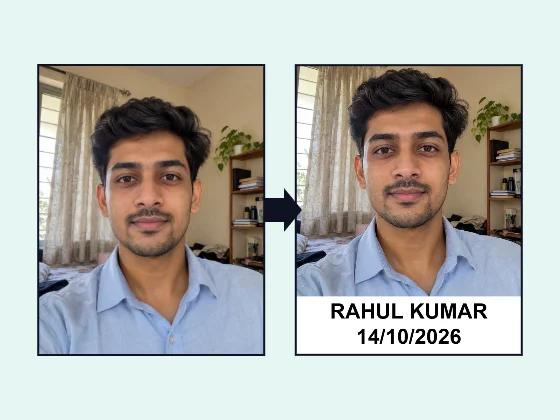
Nothing is uploaded. Add a name and date only when your exam's notice asks for it, write the name as it is in your application, and use the date the photo was actually taken.

Name and date on the photo, done properly
Some recruitment notices ask for a photo with the candidate's name and the date the photo was taken written on it. The idea is simple: it shows the photo is recent and belongs to you. In practice it trips many people up. Writing on a printed photo with a pen and scanning it looks messy, photo studios charge for it, and general photo editors don't save the file at the pixel size and KB range the portal accepts.
This tool does all three steps at once. It crops your photo to the exam size, adds your name and date in a clean, readable strip, and saves a JPG inside the KB limit. It runs in your browser, so your photo is never uploaded.
How to add your name and date
- Choose the exam or size. Kerala PSC and HSSC CET are at the top because their notices ask for the name and date. The list also has the official photo sizes of bank, NTA and other exams, common sizes, and a custom size in pixels, cm, mm or inches.
- Upload your photo. Drag the preview to move it and pinch, scroll or use Zoom so your face fills most of the photo area above the strip. Rotate and Brightness are there if you need them.
- Type your name as it is in your application. Capital letters are on by default.
- Set the date the photo was taken and choose the format: DD/MM/YYYY, DD.MM.YYYY, DD-MM-YYYY or DD Mon YYYY. You can add "Date:" or "DOP:" before it.
- Adjust the layout. Keep the text in a strip below the photo, or print it over the bottom of the photo. Choose two lines or one line, Arial-style or Times-style letters, and the strip height. The text size adjusts itself so long names still fit.
- Download the JPG. The box under the preview shows the exact pixel size and file size, and warns you if the name or date is missing.
Which exams ask for it (checked October 2026)
We include an exam here only when its official notice says so. These are the ones we confirmed:
| Exam body | What the notice says | Photo size |
|---|---|---|
| Kerala PSC | "The name of the candidate and the date of taking photograph should be printed at the bottom." Recruitment notices of December 2025 repeat this. | 200 px high, 150 px wide, up to 30 KB, JPG (notification dated 25/04/2025) |
| HSSC (Haryana CET Group C, Advt. 02, 03 and 04/2026) | "Latest scanned colored photograph with white background clearly mentioned date and name of the candidate on the photograph." | Not given in the advertisement (Advt. 02/2026) |
A note on UPSC. UPSC's recruitment advertisement No. 09/2025 asked candidates to make sure "the name of candidate and the date on which the photograph was taken are clearly mentioned on the photograph", and that the photo was not more than 10 days old. UPSC has since moved to a Common Application Form. Its current photo instructions ask for a JPG of 20 to 200 KB with a plain white background and the face covering about 3/4 of the photo, and they do not mention a name or date. So check the instructions of the exact application you are filling before adding text.
Many coaching sites say other exams need a name and date too. We have left those out until we can confirm them in an official notice. If your notice asks for it, use the custom size or the closest preset.
Mistakes that get photos rejected
- The wrong date. Write the day the photo was taken. Kerala PSC, for example, wants a new profile photo taken within the last six months, and UPSC's 2025 advertisement wanted it within 10 days of the application opening.
- A different name. Spell the name the way it is in your application, not a nickname or short form.
- Text too small to read. At 150 × 200 px each letter is only a few pixels tall. Keep the strip at 18–25% and use bold text.
- Face too small. The strip uses part of the frame, so zoom in until your face fills most of the photo area.
- Background. HSSC asks for a white background. If yours is not plain, change it first with our photo background changer, then bring the photo here.
- File over the limit. The tool picks the highest JPG quality that fits the maximum KB, and adds harmless padding inside the file when a notice sets a minimum KB.
Strip below or text on the photo?
"Strip below the photo" keeps your whole face clear and puts the text on a plain band, which is how most photo studios do it. "On the photo" places the same band over the bottom of the photo instead, so the photo area stays larger; use it only if your chest and shoulders take up the bottom part. A black strip with white text is available if your notice shows that style.
Tips for the photo itself
Take a fresh photo in daylight, facing a window, against a plain light wall. Hold the phone at eye level, look straight at the camera and keep both ears visible. No caps or dark glasses. Leave some space above your head so the crop is easy. For an exam that also needs a signature or thumb impression, use our exam photo and signature resizer.
MuftTools is not affiliated with Kerala PSC, HSSC, UPSC or any exam body. Notices change every year, so read the current one before you upload.
Exam pages
Frequently asked questions
How do I add my name and date below my photo online?
Choose your exam or size, upload your photo, and type your name. The date is set to today; change it to the day the photo was actually taken and pick the date format. The name and date appear in a white strip under the photo, and you can download a JPG at the right pixel size and KB.
Which exams ask for the name and date on the photo?
Among the notices we checked in October 2026, Kerala PSC asks for the candidate's name and the date the photo was taken printed at the bottom, and HSSC's CET Group C advertisements of 2026 ask for a coloured photo with a white background with the date and name on it. Always read the notice of your own exam, because rules change.
Does UPSC need the name and date on the photo?
UPSC's older recruitment advertisements, such as Advt. No. 09/2025, asked for the name and the date the photo was taken to be clearly shown on it. UPSC's current Common Application Form instructions do not ask for this; they ask for a plain white background, a face covering about 3/4 of the photo, and a JPG of 20 to 200 KB. Follow the instructions for the application you are filling.
Which date should I write on the photo?
The date the photo was taken, not today's date or your date of birth. Many notices also limit how old the photo can be, so take a fresh photo if yours is older than the notice allows.
What date format should I use?
Use the format your notice shows. If it shows none, DD/MM/YYYY (for example 14/10/2026) is the most common in India. The tool also offers DD.MM.YYYY, DD-MM-YYYY and DD Mon YYYY.
Should the name be in capital letters?
Capital letters are easiest to read at small sizes, so the tool uses them by default. Write the name as it appears in your application. You can turn capitals off if your notice says otherwise.
Will adding the strip make my face too small?
The strip takes part of the photo's height, 20% by default. Zoom in a little so your face still fills most of the photo area, or lower the strip height. You can also print the text on the bottom of the photo instead of below it.