QR Code Scanner Online
Scan a QR code with your phone or laptop camera, or from a photo or screenshot. See exactly what it contains, with safety checks for UPI payments and links, before you open anything.
- 100% free
- No sign-up
- Runs in your browser
- Updated October 2026
Point your camera at a QR code. Nothing opens until you choose to.
Works with UPI payment codes, website links, Wi-Fi, contact cards (vCard), phone numbers and plain text. We never open a link or start a payment by ourselves.
Result
Recent scans
No scans yet. Your scans stay in this browser only.
Scan a QR code and see what it does, before you tap
QR codes are everywhere in India: on shop counters for UPI payments, on restaurant tables, on bills, wedding cards, product boxes and government notices. Most phone cameras open a QR code straight away, which is convenient until the code leads somewhere you did not expect. This free QR code scanner reads the code and shows you its contents as plain text first. It never opens a link, starts a payment or joins a network by itself.
You can scan with the camera of your phone or laptop, or from a photo or screenshot, which is handy when someone sends you a QR code on WhatsApp and you want to read it on the same phone. Everything happens in your browser. The image and the result are not uploaded, and there is no app to install.
How to scan a QR code online
- With the camera: tap Start camera, allow camera access, and hold the code inside the frame. On phones the back camera is used. The scan stops as soon as a code is found.
- From an image: open Image or screenshot and choose the photo, drop it on the box, or copy a screenshot and press
Ctrl+V. - Read the result. We show what kind of code it is (UPI payment, website link, Wi-Fi, contact card, phone number or text), the important details, and any warnings.
- Act only if you trust it. Use the buttons to copy the UPI ID, Wi-Fi password or link, save a contact, or open the link yourself. The exact content of the code is always available under Exact content of the code.
What the scanner checks
| Code type | What you see | Checks and warnings |
|---|---|---|
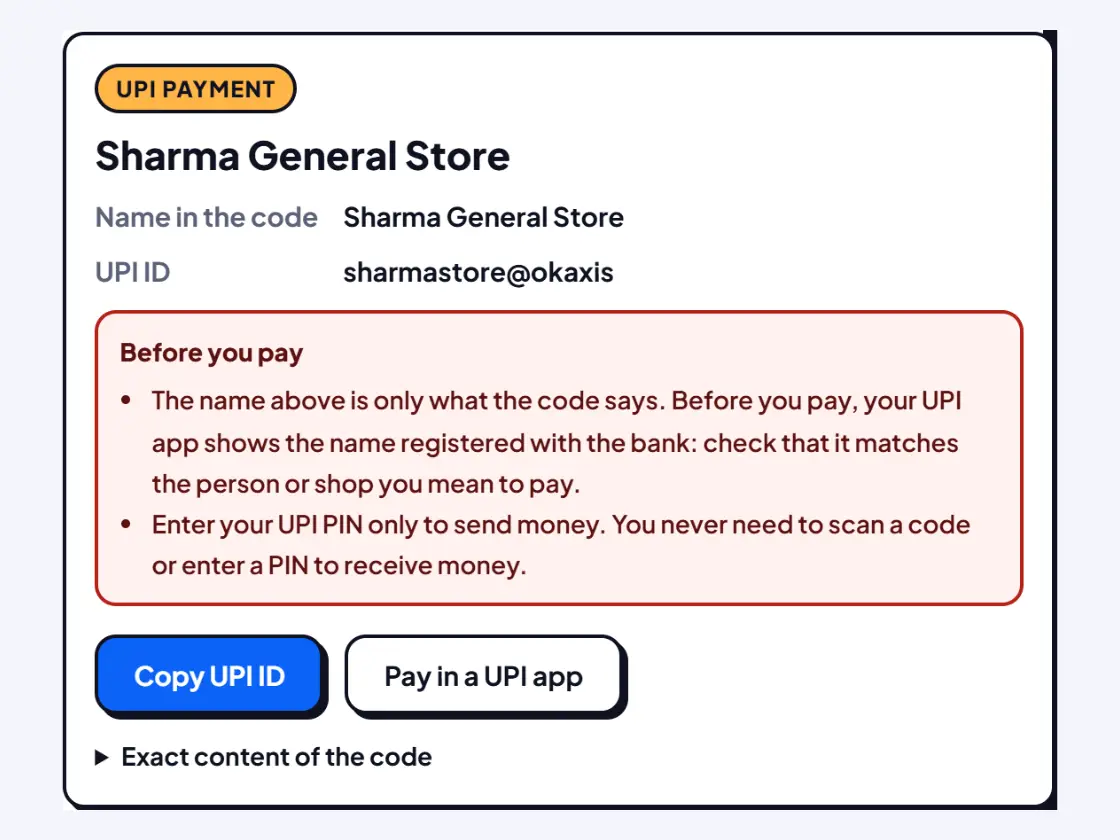
UPI payment (upi://pay) | Name in the code, UPI ID, fixed amount, note | Fixed amount, unusual UPI ID, collect or mandate requests, the "PIN only to send money" reminder |
| Website link | The domain in large letters, and the full link | Short links that hide the address, look-alike spellings of banks and shops, links without https, bare number addresses, app (.apk) downloads |
| Wi-Fi | Network name, security type, password | Open networks without a password |
| Contact card (vCard) | Name, phones, email, company, address | Save it as a .vcf file to add to your contacts |
| Phone, SMS, email, location, text | The number, address or text | SMS codes that may send a paid message |
Paying with a UPI QR code safely
A UPI QR code simply holds a payment link with the payee's UPI ID, a name and sometimes an amount. Anyone can make one with any name written in it, which is why the name the code shows is not proof of who will get the money. When you scan a code in your UPI app, the app looks up the account and shows the name registered with the bank. Compare that name with the shop or person you mean to pay before you enter your PIN.
Keep these points from NPCI's UPI Safety Shield in mind:
- Enter your UPI PIN only to send money. A UPI PIN is never needed to receive money.
- Scan a QR code only to make a payment, never to "receive" a refund, prize or cashback. Requests like these are a common fraud.
- Check the receiver's name before you pay, and never share your UPI PIN or OTP with anyone.
Shop owners can also check their own payment poster here: scan it and confirm that the UPI ID is yours. Stickers pasted over a genuine code are a known trick, so check your counter now and then. If you need a new one, make it with our free UPI QR code generator.
Spotting risky links
A QR code can hide any web address, so look at the domain we show in large letters, not the words around the code. Our checks flag the usual tricks:
- Short links such as bit.ly hide the real website until you open them.
- Look-alike names put a bank or brand name inside a different domain, such as a made-up "sbi-kyc-update" site, or swap letters for numbers.
- App downloads ending in .apk install software from outside the app store, a common way to take over phones. Install apps only from the Play Store or App Store.
- No https means the connection is not encrypted, so never enter passwords or card details.
Since 2025, the RBI has asked Indian banks to move their websites to the .bank.in domain, which only banks can register (RBI circular, 22 April 2025). Government sites in India use .gov.in. A link with a clean result is not a guarantee of safety, though. If a code asks you to log in, pay, update KYC or share an OTP, go to the official app or website yourself instead.
Camera problems and fixes
- Permission blocked: tap the lock or settings icon next to the web address, allow Camera and reload. On iPhone, also check Settings › Safari › Camera.
- No camera found: some desktops have none. Save or screenshot the QR code and use the Image tab.
- Camera busy: close video calls or other apps using the camera, then try again.
- The code will not scan: move closer so the code fills most of the frame, add light, or tap Torch on phones that support it. Very small, blurred or damaged codes may need a clearer photo.
Privacy
The scanner runs entirely in your browser. Camera frames and images are read on your device and are not sent anywhere. Your recent scans are kept only in this browser so you can find them again; switch off Keep history on this device or tap Clear history whenever you like. This is an independent tool and is not affiliated with NPCI, any bank or any UPI app.
Frequently asked questions
How do I scan a QR code from an image or screenshot?
Open the Image or screenshot tab and choose the photo, drop it on the box, or copy the screenshot and press Ctrl+V. The code is read on your device and the result appears on the right. Nothing is opened until you tap a button yourself.
How do I scan a QR code on a laptop?
Tap Start camera and allow camera access when the browser asks, then hold the code in front of the webcam. If your laptop has no camera, take a screenshot of the code or save the image, and use the Image tab instead.
How can I see the UPI ID inside a QR code?
Scan the code here. For a UPI code we show the name written in the code, the UPI ID, any fixed amount and the note. Your UPI app then shows the name registered with the bank before you pay, so compare the two.
Is it safe to scan a QR code to receive money?
No. You never need to scan a QR code or enter your UPI PIN to receive money. NPCI's safety advice is to enter your UPI PIN only to send money. Anyone asking you to scan a code to get a refund, prize or payment is likely trying to cheat you.
Why does it say camera permission is blocked?
Your browser has been told not to let this site use the camera. Tap the lock or settings icon next to the web address, allow Camera, and reload the page. You can always scan a photo or screenshot in the Image tab without camera access.
Does the scanner keep a history?
Yes, the last 30 scans are kept in your own browser so you can find a code again. Nothing is sent to us. Turn off Keep history on this device, or tap Clear history, at any time.
Can it scan barcodes too?
On phones and browsers with a built-in barcode reader, such as Chrome on Android, the camera and image scan also read common product barcodes like EAN-13. On other browsers it reads QR codes only.