Aadhaar & PAN Card Print on A4
Cut the front and back of your e-Aadhaar, e-PAN or a photo of any ID card, and print them at the exact card size on one A4 sheet. Everything happens on your device.
- 100% free
- No sign-up
- Runs in your browser
- Updated October 2026
1Card and file
2Fit the boxes to the card
Drag a corner, or drag inside the box to move it. The dark edge is the top of the card. Phone photos taken at an angle are straightened.
3Page layout
A4 print preview
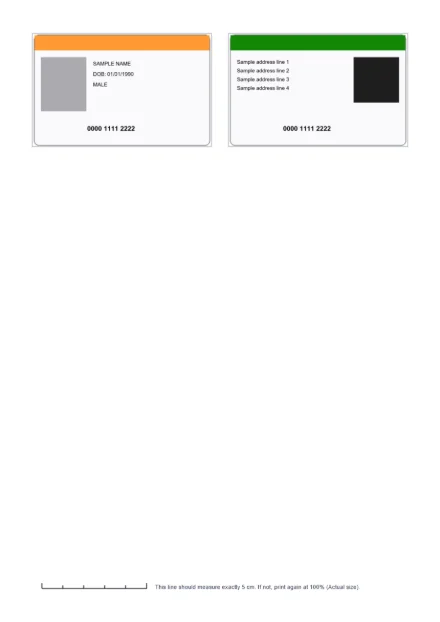
Cards print at 85.6 × 54 mm, the standard ID card size. Print at 100% (Actual size), not "Fit to page".
Not affiliated with UIDAI or the Income Tax Department. Your card stays on your device.
Print your Aadhaar or PAN at real card size
A downloaded e-Aadhaar is an A4 page: a letter at the top, and the card-sized front and back near the bottom. Printing the whole page wastes paper, and cutting the card out of it by hand rarely comes out straight. Phone photos of a card are worse: printed as they are, they come out tilted and at a random size.
This tool takes the front and back from your e-Aadhaar PDF, e-PAN PDF, a scan or a phone photo, straightens them and lays them out at the exact card size on an A4 sheet, with cut lines. You get a PDF or JPG that prints correctly at 100% scale. It is handy for keeping a spare copy in your wallet or bag, for forms that ask for a self-attested copy, and for cyber cafés and CSC centres that print cards for customers.
Everything runs in your browser. Your card is never uploaded.
How to print Aadhaar front and back on A4
- Pick the card: Aadhaar, PAN card or Other ID card.
- Add the file. Choose your e-Aadhaar PDF and type its password, or add a photo or scan of the front and the back. You can add up to 4 files or pages.
- Check the boxes. The tool looks for the card and places a box on the front and the back. Drag the corners onto the card edges; use Zoom in for the small card panels on an e-Aadhaar page. The dark edge marks the top of the card; use Rotate 90° if it is on the wrong side.
- Choose the layout. Side by side prints front and back with a gap, to cut out separately. Joined, fold in the middle prints them touching at a dashed fold line, so one cut and one fold give a two-sided card.
- Choose copies (1, 2 or 4 sets per page) and keep the cut lines and 5 cm check line on.
- Download the PDF (best for printing) or JPG, or press Print.
Card size and printing at 100%
Every card is placed at the ISO/IEC 7810 ID-1 size, the size of a bank card and most plastic ID cards:
| Unit | Width × height |
|---|---|
| Millimetres | 85.6 × 54 mm |
| Centimetres | 8.56 × 5.4 cm |
| Inches | 3.37 × 2.13 in |
| Pixels at 300 DPI (in the JPG) | 1011 × 638 px |
The size is only right if nothing scales the page while printing. In the print dialog choose 100%, Actual size or Page scaling: None, not "Fit to page" or "Shrink to fit". The page carries a 5 cm line at the bottom: measure it with a ruler. If it is not exactly 5 cm, change the print setting and print again. Lay your own card on the printout to compare before you cut.
What UIDAI says about printed Aadhaar
UIDAI's FAQ states that, as per the Aadhaar Act, e-Aadhaar is equally valid like the physical copy of Aadhaar for all purposes. In a press release of 6 February 2018, UIDAI said that the printout of the downloaded Aadhaar, even in black and white, is as valid as the original Aadhaar letter, and that there is no need to get it laminated or printed on plastic by private vendors. That release also warned that such vendor-made cards often have a QR code that no longer works.
If you want a durable plastic card, UIDAI now runs its own Order Aadhaar PVC Card service: your Aadhaar details are printed on a PVC card for a nominal charge and sent by post. Order it only from the official site, myaadhaar.uidai.gov.in, where the current fee is shown.
When you hand a copy to someone who does not need your full number, consider downloading a masked e-Aadhaar from UIDAI first. It replaces the first 8 digits of the number with "xxxx-xxxx" and shows only the last 4.
Tips for a clean, readable print
- Use the PDF, not a photo, when you have it. The e-Aadhaar and e-PAN PDFs give the sharpest result, and the QR code prints crisply.
- For photos, shoot from straight above on a dark, plain surface in daylight, without flash glare. The tool straightens a tilted card, but it cannot fix blur.
- Use the PDF download for printing. It places the cards at exact millimetre sizes. The JPG is 300 DPI and also prints at the right size at 100%, but some photo apps crop or fit it to the paper.
- Thick paper helps. A 170 to 250 gsm sheet makes a sturdier card. Fold and laminate only your own copy.
- Black and white is fine. UIDAI's 2018 release says a black and white printout of the downloaded Aadhaar is valid.
The e-Aadhaar password
The e-Aadhaar PDF is locked. According to UIDAI, the password is the first 4 letters of your name as on Aadhaar, in capital letters, followed by your year of birth: SURESH KUMAR born in 1990 gives SURE1990, and P. KUMAR gives P.KU1990. The password is used only on your device to open the file. If you need an unlocked copy of the whole PDF, use the PDF password remover.
Other cards
PAN card mode works the same way with an e-PAN PDF or photos. Choose Other ID card for voter ID, driving licence, college or office ID cards, and switch to Portrait for cards that stand upright. Need to make an ID card rather than print one? Try our passport size photo maker for the photo first.
MuftTools is not affiliated with UIDAI, the Income Tax Department or any card issuer. The card you print is your own document.
Frequently asked questions
What is the size of an Aadhaar card for printing?
This tool prints each side at 85.6 × 54 mm (8.56 × 5.4 cm, about 3.37 × 2.13 inches), the standard ID-1 card size used by bank cards and most plastic ID cards. Print the PDF at 100% (Actual size) and check the 5 cm line at the bottom of the page with a ruler.
How do I print Aadhaar front and back on one A4 page?
Choose your e-Aadhaar PDF and type its password. The tool finds the front and back card panels at the bottom of the page; check the boxes, pick Side by side or Fold, and download the PDF. Print it at 100% scale on A4 paper.
Is a printout of e-Aadhaar valid?
UIDAI says e-Aadhaar is equally valid like the physical copy of Aadhaar for all purposes. In a 2018 press release it added that a printout of the downloaded Aadhaar, even in black and white, is as valid as the original Aadhaar letter.
What is the password of the e-Aadhaar PDF?
UIDAI says it is the first 4 letters of your name as on Aadhaar, in capital letters, followed by your year of birth, such as SURE1990 for SURESH KUMAR born in 1990.
Can I get an official plastic (PVC) Aadhaar card?
Yes. UIDAI's Order Aadhaar PVC Card service lets you order your Aadhaar details printed on a PVC card for a small fee, delivered by post. Order it only on UIDAI's official site, myaadhaar.uidai.gov.in, and check the current fee there.
Why does my printout come out smaller or larger than the card?
The printer or PDF app scaled the page. In the print dialog choose 100%, Actual size or 'None' for page scaling instead of 'Fit to page' or 'Shrink to fit'. The 5 cm line at the bottom of the page should then measure exactly 5 cm.
Can I print a PAN card or voter ID the same way?
Yes. Choose PAN card or Other ID card, add an e-PAN PDF or photos of the front and back, and fit the boxes. For upright cards, choose Portrait under Other ID card.
Is my Aadhaar uploaded anywhere?
No. The PDF or photo is opened, cropped and laid out by your browser on your own device. Nothing is sent to a server, and the file is gone when you close the tab.