Baby Birth Announcement Card Maker
Tell family and friends that your baby has arrived. Add the name (or just your names), date and time of birth, weight, length and a photo, pick one of seven drawn designs, and share the card on WhatsApp or print it. Labels in English or Hindi, and the rashi and nakshatra if you like.
- 100% free
- No sign-up
- Runs in your browser
- Updated November 2026
1About the baby
2Family
3Words
4Photo optional
Drag the photo to centre the face.
Without a photo, the card shows a drawn sleeping baby. The photo stays on your phone or computer; it is not uploaded or saved.
5Rashi and nakshatra optional
Type 2 letters and pick the town. The time of birth is needed too.
6Design
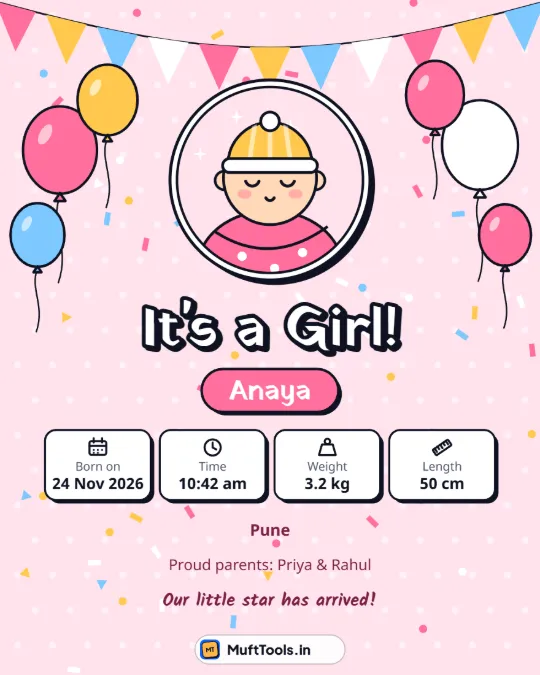
Sample card. Add your baby's details and it updates as you type.
Prints the post-size card. Pick the same paper size in the print window.
Check the spelling and the date before you send it. Your details and photo stay in this browser; nothing is uploaded.
Quick answer
MuftTools.in's free birth announcement card maker puts your baby's name, date and time of birth, weight, length, place and your names on a ready-made design: balloons, starry night, marigold toran, tiny feet, newspaper, arrival pass or rainbow. It makes a 1080 × 1350 card for chats and posts or a 1080 × 1920 card for status and stories, with labels in English or Hindi, an optional baby photo and an optional Moon rashi, nakshatra and name letter. Everything runs in your browser and the photo is never uploaded.
- Designs
- 7: balloons, starry night, marigold toran, tiny feet, newspaper, arrival pass, rainbow
- Sizes
- 1080 × 1350 PNG (post, chat) and 1080 × 1920 PNG (status, story); A5 or A6 print
- Card labels
- English or Hindi (जन्म तिथि, समय, वज़न, लंबाई)
- Details
- Name or 'Baby of' line, date and time of birth, weight in kg or grams, length in cm, place, parents, sibling line, message, optional blessing line
- Rashi block
- Optional Moon rashi, nakshatra and pada with the name letter, from the date, time and town of birth (sidereal, Lahiri)
- Privacy
- Runs in your browser; the photo is never uploaded or saved

How to make a birth announcement card
- Choose the heading. Tap It's a girl, It's a boy or Hello, baby. In Hindi the card says बिटिया आई है!, बेटा आया है! or नन्हा मेहमान आया है!
- Add the details. Type the baby's name, the date and time of birth, the weight, the length and the city or hospital. Every field except the date is optional; anything you leave empty simply does not appear on the card.
- Add the family. Enter the mother's and father's names and, if you like, a line for an older brother or sister, such as "Big brother Aarav".
- Pick the words. Tap one of the ready messages in English or Hindi, or write your own. Switch the card labels between English and हिंदी.
- Add a photo if you want. Choose a photo, then drag it and use the zoom slider to centre the face. Without a photo, the card shows a drawn sleeping baby.
- Choose a design, colours and size, then tap Share on WhatsApp, Download PNG or Print card.
The preview updates as you type, and long lines shrink a little to fit.
What to put on the card
Most birth announcements share the same few facts, and the card has a place for each:
- Name: many families wait for the naming ceremony (namkaran, aqiqah and so on) before deciding. Leave the name empty and the card shows "Baby of Priya & Rahul" instead. You can make a second card with the name later.
- Date and time of birth: the time is shown as 10:42 am in English and सुबह 10:42 बजे in Hindi. The time is also needed if the family wants a kundli made.
- Weight: type it in kilograms (3.2) or switch to grams (3200), whichever your hospital papers use.
- Length: in centimetres, if the hospital measured it.
- Place: a city such as Pune, or the hospital name, whatever you are comfortable sharing.
- Message: a short line works best on a phone screen. "Our little star has arrived!" or "बधाई हो! हमारे घर नन्ही परी आई है।" both fit comfortably; a longer message wraps over two or three lines.
The cards are plain by default. If your family likes to start with a blessing, add a line at the top: the quick choices include ॥ श्री गणेशाय नमः ॥, Bismillah, Waheguru Ji Ka Khalsa, With God's blessings and ॥ जय जिनेन्द्र ॥, or you can type your own.
The seven designs
Each design is drawn fresh with your details:
- Balloons: bunting, a bunch of balloons and confetti, with the facts in bold tiles.
- Starry night: a crescent moon, stars and clouds on a deep night sky with gold lettering.
- Marigold toran: a genda-phool toran across the top, a rangoli border and the photo in an arched jharokha frame.
- Tiny feet: a quiet pastel card with baby footprints and a tilted photo print.
- Newspaper: "Breaking news" in a front-page layout, with the story of the arrival written from your details.
- Arrival pass: a boarding-pass style ticket from "the stars" to "our home", with the arrival time, weight and a barcode stub.
- Rainbow: a soft rainbow, sun and clouds around the photo, with the facts in round pills.
Colours follow the heading (pink for a girl, blue for a boy, mint for baby) unless you pick another set: yellow, lilac and peach are there too.
Sizes for WhatsApp, status and print
The post size, 1080 × 1350 pixels, suits family groups, chats and feed posts, where a slightly tall picture shows large without being cropped. The status / story size, 1080 × 1920 pixels, fills a phone screen in WhatsApp status and stories. Both download as PNG files.
To give printed cards to elders or keep one for the baby book, choose A5 or A6 and tap Print card. Select the same paper size in the print window and print at 100%. A5 is a common greeting-card size; A6 is postcard size.
On a phone, Share on WhatsApp opens the share sheet with the card image and a short text. On a computer it opens WhatsApp with the text, and you can attach the downloaded PNG. Copy message text copies a ready line such as "It's a girl! 👶 Welcome, Anaya. Born 24 Nov 2026, 10:42 am, 3.2 kg" for SMS or email.
Rashi, nakshatra and name letter
Many Indian families choose a name that starts with the sound linked to the baby's birth nakshatra. Switch on the rashi block and pick the town of birth: the page works out where the Moon was at the time of birth in the sidereal zodiac (Lahiri ayanamsa), the same calculation as our kundli maker and naam se rashi tool. The card then shows the Moon rashi, the nakshatra with its pada, and the name letter of that pada. Below the preview you also see all four letters of the nakshatra.
The time of birth matters here: the Moon moves into a new pada roughly every six hours, so a birth in the morning and one at night can get different letters. If you are still deciding on a name, the baby name by date of birth tool lists names for these letters. Naming by nakshatra is a tradition, not a rule; many families choose freely.
Sharing safely
The photo is drawn on the card inside your browser. It is not uploaded and is not saved; only the typed details are remembered in this browser, and Clear all removes them. For a public post, you may prefer to leave out the exact time and the hospital and keep those for the family group. A card without a photo, using the drawn baby, is another option if you would rather not share the baby's face yet.
Remember to register the birth
A card is for celebrating; the legal record is the birth registration. Under the Registration of Births and Deaths Act, a birth must be reported to the local registrar within 21 days. For a birth in a hospital or nursing home, the hospital reports it. The birth can be registered before you choose a name, and the name added later; Delhi's registration office, for example, adds it free of cost within one year. Check with your municipal office or hospital for the steps where you live.
More for new parents
Keep the baby's tika dates on track with the baby vaccination chart, make monthly milestone pictures with the month photo maker, and invite family to the naming ceremony with the invitation card maker.
Frequently asked questions
We have not chosen a name yet. Can we still make the card?
Yes. Leave the name empty and the card shows "Baby of" with the parents' names, for example "Baby of Priya & Rahul". In Hindi it reads "Priya और Rahul की बिटिया" or "का बेटा". You can make a new card with the name after the naming ceremony.
Which size should I use for WhatsApp?
Use the post size (1080 × 1350) to send the card in a chat or family group and for feed posts. Use the status size (1080 × 1920) for WhatsApp status and stories, where a tall picture fills the screen.
Can I write the weight in grams?
Yes. Type the weight and tap grams, for example 3200, and the card shows 3200 g (3200 ग्राम in Hindi). With kg selected, 3.2 shows as 3.2 kg.
How is the rashi and nakshatra worked out?
From the date, time and town of birth, the page finds where the Moon was in the sidereal zodiac (Lahiri ayanamsa), the same calculation as our kundli tools. That gives the rashi, the nakshatra and its pada, and the traditional name letter of that pada. It needs the time of birth, because the Moon moves into a new pada about every six hours.
Is my baby's photo uploaded anywhere?
No. The photo is read and drawn on the card inside your browser. It is not uploaded and not saved; the other details are remembered only in this browser so you can come back and edit, and Clear all removes them.
Can I print the card?
Yes. Choose A5 or A6 and tap Print card. Pick the same paper size in the print window and print at 100%. The printed card uses the post-size design.
Do I have to add a religious line?
No. The cards are plain by default. If you want a blessing line at the top, pick one of the quick choices (such as ॥ श्री गणेशाय नमः ॥, Bismillah, Waheguru Ji Ka Khalsa or With God's blessings) or type your own.