GPS Map Camera Online
Stamp a small map, the address, latitude and longitude, and the date and time on a photo you have already taken. The tool reads the location saved in the photo, or uses your current location or one you enter. Your photo never leaves your device.
- 100% free
- No sign-up
- Runs in your browser
- Updated October 2026
1Choose your photo
2Location
In Google Maps, long-press a spot to drop a pin, then copy the numbers shown at the top and paste them here.
3Address, date and time
4Template and style
Adds a small line such as "Location: photo GPS", "device GPS" or "entered manually", so anyone viewing the photo knows where the location came from.
5Preview and download
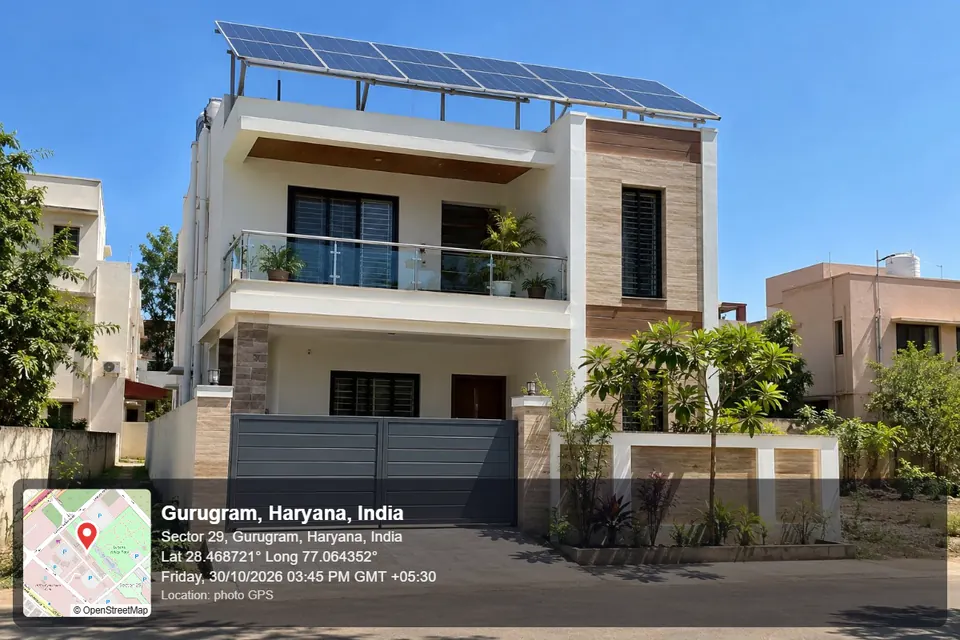
Map data © OpenStreetMap contributors. Addresses from Nominatim. Only the coordinates are sent to OpenStreetMap; your photo never leaves this device.
Use this for photos you actually took at that place, with the real date and location. Schemes that name an official app need that app: PMAY-G house photos are geotagged in AwaasApp and MGNREGA assets in the Bhuvan/GeoMGNREGA app. A stamped JPG does not replace them.
Quick answer
MuftTools.in's GPS map camera online adds a location stamp to a photo you already have: a small OpenStreetMap map with a pin, the place and address, latitude and longitude, and the date and time. It reads the GPS saved in the photo when there is one, or uses your current location or coordinates you enter. Pick from five templates and download a full-size JPG. The photo stays in your browser.
- Location from
- The photo's own GPS (EXIF), your device's location, pasted coordinates or a Google Maps link, or a place search
- Templates
- Classic, Minimal, Advanced (altitude, direction, Plus Code), Site card with logo, and Date stamp
- Formats
- DD/MM/YYYY, DD-MMM-YYYY or YYYY-MM-DD; 12 or 24 hour; decimal or degrees-minutes-seconds
- Output
- JPG at the photo's own size (long side up to 4000 px)
- Price and privacy
- Free; the photo is never uploaded, only coordinates go to OpenStreetMap

A GPS stamp for photos you have already taken
A GPS-stamped photo has a small information bar printed on it: a map with a pin, the place and address, the latitude and longitude, and the date and time. Contractors, solar installers, surveyors, property owners and field staff use such photos to show where and when a picture was taken. Most people make them with a camera app, which works only for new photos and fills the screen with ads.
This tool works on photos already in your gallery. It reads the location your camera saved inside the photo, looks up the address, draws a map from OpenStreetMap and stamps everything on the picture. It runs in your browser, so the photo itself is never uploaded.
How to add a GPS location to a photo
- Choose the photo. If it was taken with location on, the latitude, longitude, date and time are filled in from the photo, along with the altitude and direction when the camera saved them. The address is then looked up for you.
- Add the location if the photo has none. Tap Use my current location when you are still at the spot, paste coordinates or a Google Maps link, type latitude and longitude, or search for the place and pick it from the list.
- Check the address, date and time. The place title (such as "Gurugram, Haryana, India") and the full address can be edited. The time zone is set from your phone, for example GMT +05:30 in India.
- Pick a template and style. Choose the position, a dark or light bar, the date format, a 12 or 24 hour clock, decimal or degrees-minutes-seconds coordinates, and how close the map is zoomed.
- Download the JPG, or tap Share on a phone to send it straight to WhatsApp or email. The file keeps your photo's own size (up to 4000 px on the long side) and is named with the date and time, such as gps-photo-2026-10-30-1545.jpg.
The five templates and when to use each
| Template | What it shows | Good for |
|---|---|---|
| Classic | A translucent rounded bar with the map on the left and the place, address, coordinates and day, date and time on the right | The familiar GPS camera look for site visits, travel and general records |
| Minimal | A small box in any corner with the coordinates, date-time and area name, without a map | Photos where the subject must stay clear, such as documents and close-ups |
| Advanced | Classic plus small chips for altitude, direction, Plus Code, accuracy, weather and a note | Field surveys, farm and plantation records, and inspection photos |
| Site card | A white card with a coloured header for the project name and your logo, plus site ID or customer, who took the photo, address, coordinates, time, map and note | Solar installers, contractors, real estate agents and service teams |
| Date stamp | Orange digits in the corner like an old film camera, with an optional coordinates line | Adding just the date and time to a photo |
The text size follows the photo's size, so the stamp looks the same on a 1000 px picture and a 4000 px one. Hindi and other Indian-language addresses print correctly too.
Why a photo may have no GPS location
The location is stored inside the photo file (in its EXIF data) only when the camera's location setting was on. It is often missing because:
- the photo was forwarded on WhatsApp or another messaging app, which removes it;
- it is a screenshot or was downloaded from the internet;
- location tagging was switched off in the camera;
- on Android, the browser's photo picker may strip it. Choosing the photo through Files or Browse can keep it.
To switch it on for new photos: on Android, open the camera app's settings and turn on Save location or Location tags (the name depends on the phone brand), and keep the phone's location on. On iPhone, go to Settings › Privacy & Security › Location Services › Camera and choose While Using the App.
How to get coordinates from Google Maps
On a phone, long-press the exact spot to drop a pin. The coordinates appear in the search box or in the Dropped pin card; copy them and paste them into this tool. On a computer, right-click the spot and click the numbers in the first line of the menu to copy them. A full Google Maps link that contains @28.45,77.02 or q=28.45,77.02 also works. Short links such as maps.app.goo.gl cannot be opened from the browser, so copy the numbers instead. Degrees-minutes-seconds such as 28°27'34.2"N 77°01'35.9"E are understood as well.
Where people use GPS-stamped photos
- Site visits and work progress: before-and-after photos for clients, contractors and inspections.
- Rooftop solar: DISCOM procedures for PM Surya Ghar ask for geo-tagged photos of the installed plant, usually uploaded by the vendor. Check your DISCOM's own SOP for what the photo must show.
- Property records: for example, Bengaluru's e-Khata process records the property's GPS location and a photo through its own portal. Follow the portal's steps; a stamped photo can be a helpful extra copy.
- Field work: surveys, farm visits, plantation drives and school activity records.
- Real estate and travel: listing photos with the locality, and holiday pictures with the place and date.
An honest note about official apps
Some schemes require the photo to be captured inside their own app, which records the location at the moment of capture. PMAY-G house photos are geotagged in AwaasApp, and MGNREGA assets through the Bhuvan / GeoMGNREGA apps. During GST registration, the GPS-tagged photos in a physical verification are taken by the tax officer. A stamped JPG from any website does not replace these steps.
Use this tool for photos you took yourself, at that place, and keep the date and location true. By default the stamp includes a small line saying where the location came from: the photo's GPS, the device, or entered manually. Anyone looking at the photo can then see how it was made.
Privacy
Your photo is opened and stamped in your browser and is never uploaded. To draw the map and find the address, only the coordinates are sent to OpenStreetMap's tile server and its Nominatim address service, along with your search text when you search a place. Nothing is sent until you choose a photo or ask for a location. A logo you add for the site card stays on your device, and the form remembers your text fields on this device only.
Map data © OpenStreetMap contributors. MuftTools is not affiliated with the "GPS Map Camera" app, Google or OpenStreetMap.
Frequently asked questions
How do I add a GPS location stamp to a photo online?
Choose the photo. If it was taken with location on, the latitude, longitude and date are filled in from the photo itself and the address is looked up. If not, tap Use my current location, paste coordinates or a Google Maps link, or search the place. Pick a template, check the address and time, and download the JPG.
Why does my photo show no GPS location?
The location is saved inside the photo only when the camera's location setting is on. Photos forwarded on WhatsApp, screenshots and downloaded images lose it, and on Android the browser's photo picker may remove it. Turn on Save location or Location tags in your camera settings for new photos, or enter the location by hand.
How do I get latitude and longitude from Google Maps?
On a phone, long-press the spot to drop a pin; the coordinates appear in the search box at the top. On a computer, right-click the spot and click the numbers in the first line to copy them. Paste them into the coordinates box. A full Google Maps link with @ or q= in it also works; short maps.app.goo.gl links cannot be read in the browser.
Can I use this photo for PMAY-G, MGNREGA or other government schemes?
Not as a replacement for the official process. PMAY-G house photos are geotagged in AwaasApp, and MGNREGA assets are geotagged through the Bhuvan and GeoMGNREGA apps. Where a scheme names an app, use that app. This tool makes a readable stamp for photos you took yourself, at the real place and time.
Is my photo uploaded anywhere?
No. The photo is read and stamped in your browser. To draw the map and find the address, only the coordinates are sent to OpenStreetMap's map tile and Nominatim servers, and your search text if you search a place. A logo you add for the site card also stays on your device.
Which template should I use for solar or site photos?
The Site card template suits installers, contractors and surveyors: it has a coloured header with the project name and an optional logo, plus site ID or customer, who took the photo, address, coordinates, date and time, a map and a note. For a solar subsidy, check your DISCOM's SOP for what the photo must show.
Can I change the date, time or location?
Yes, every field can be edited, for example when the camera clock was wrong or the address lookup picked a nearby street. Please keep them true to when and where the photo was taken. The stamp shows a small line saying whether the location came from the photo's GPS, the device or was entered manually.
Is this the GPS Map Camera app?
No. MuftTools is not affiliated with the GPS Map Camera app, Google or OpenStreetMap. The tool runs in the browser, needs no install, and the maps come from OpenStreetMap, whose data is © OpenStreetMap contributors.