Thermal Printer Test Page for 58 mm and 80 mm Printers
Print a test page on your receipt printer straight from the browser, over Bluetooth, a USB cable or the print dialog. Check width, darkness, text, ₹ and Hindi, a barcode and a QR code, or download the test page as a PDF.
- 100% free
- No sign-up
- Runs in your browser
- Updated October 2026
1Your printer
58 mm rolls print 48 mm wide (384 dots), 80 mm rolls print 72 mm wide (576 dots), at 203 dpi.
Checking what this browser can connect to…
2What to print
Hindi, ₹ and any other text print correctly, because the whole slip is sent as an image.
3Print from other tools
These tools have a Print on thermal printer button that uses the same printer settings.
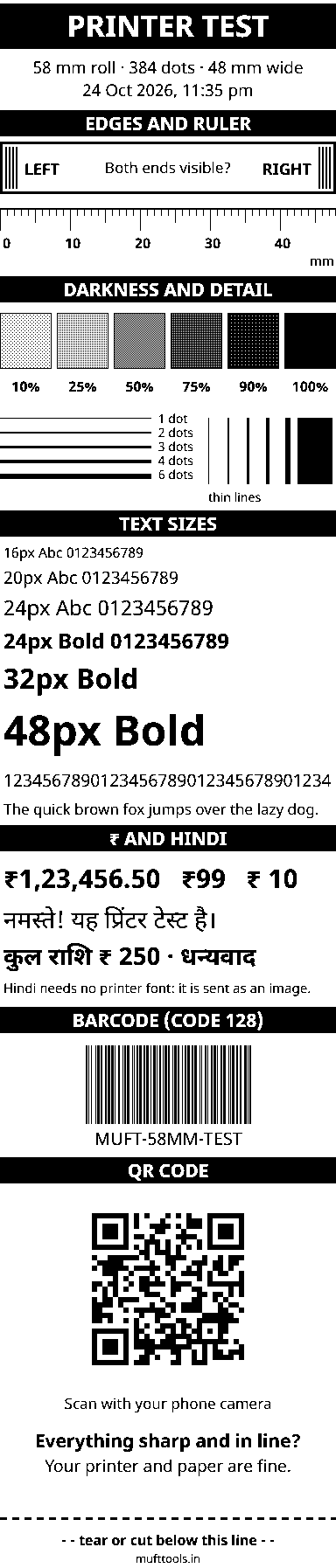
This preview shows the exact black dots your printer will get.
Nothing is installed and nothing is uploaded. Bluetooth and USB printing work in Chrome or Edge on Android, Windows, Mac and Chromebook. On iPhone, use the PDF with an AirPrint printer or your printer's app.
A test page for small receipt printers, straight from your browser
Thermal receipt printers are everywhere in Indian shops: at the billing counter of a kirana store, in restaurant kitchens for KOTs, on delivery bikes and with field staff who print bills from a phone. They have no ink. The print head heats tiny dots on coated paper, and the paper turns black where it is heated. When a new printer arrives, when the prints start to fade, or when a billing app suddenly prints rubbish, the first step is always the same: print a test page and look at it.
This page makes that test page for you, for the two common roll sizes, 58 mm (2 inch) and 80 mm (3 inch). It checks the print width, darkness, small and large text, rupee sign and Hindi, a barcode and a QR code. You can send it to the printer over Bluetooth, a USB cable or the normal print dialog, or download it as a PDF or PNG. There is no app to install and nothing is uploaded.
How to print a thermal printer test page
- Choose the paper width. Pick 58 mm or 80 mm. Measure the roll if you are not sure: a 2-inch roll is 57 to 58 mm wide, a 3-inch roll about 80 mm.
- Tap Print test page. A preview shows the exact black dots the printer will receive.
- Choose how to send it. Bluetooth for most portable printers, Paired Bluetooth / COM for printers you paired in your phone's settings, USB cable, or Print dialog for a printer installed on your computer.
- Print and compare. Check each block of the slip against the table below. Change the darkness slider and print again if the grey patches all look black or all look white.
Which connection should you use?
| Option | Works on | Good for |
|---|---|---|
| Bluetooth | Chrome or Edge on Android, Windows, Mac and Chromebook | Portable 58 mm printers that use Bluetooth Low Energy. No pairing needed: pick the printer from the list. |
| Paired Bluetooth / COM | Recent Chrome or Edge on Android and computers | "Classic" Bluetooth printers. Pair them first in Bluetooth settings (the PIN is often 0000 or 1234). |
| USB cable | Chrome on Android (with an OTG cable), Mac, Chromebook | Counter printers plugged into a phone or tablet. On Windows the printer driver usually holds the USB port, so use the print dialog there. |
| Print dialog | Every browser, including iPhone | Printers installed with their driver, AirPrint printers, or Android printing apps. |
Bluetooth, serial and USB printing use features built into Chromium-based browsers (Web Bluetooth, Web Serial and WebUSB). Firefox and Safari do not have them, and iPhone browsers cannot reach Bluetooth printers at all, so on an iPhone download the PDF and print it with an AirPrint printer or your printer's own app. The browser always asks you to choose the printer; a website cannot see your devices on its own.
Reading your test page
| Block | What good looks like | If it is wrong |
|---|---|---|
| Edges box and mm ruler | Both the LEFT and RIGHT bars print, and the ruler runs from 0 to 48 (or 72) mm | One side missing: the printer has fewer dots per line. Open More settings and try 360 or 512 dots. |
| Darkness patches | Six clearly different greys from 10% to solid black | All dark: lower the darkness. All pale or the black block is grey: raise it, or the paper is old. |
| Thin lines | Even the 1-dot line is unbroken | Gaps along the paper: a dirty or worn print head. Clean it with isopropyl alcohol on a cotton bud once it has cooled. |
| Text sizes, ₹ and Hindi | Small text is readable, and Hindi letters join correctly | Blurred letters: raise the darkness a step, or check the paper is thermal paper. |
| Barcode and QR code | Both scan with a phone | Fails to scan: lower the darkness if bars run together, raise it if they are faint. |
| Cut line | The slip ends below the dashed line | Cut too early: increase feed in the printer's settings, or tear by hand. |
Most 58 mm and 80 mm receipt printers print at 203 dpi, which is 8 dots per millimetre. A 58 mm roll leaves a 48 mm wide printing area (384 dots) and an 80 mm roll a 72 mm area (576 dots). A few printers use other widths, which is why the edge box matters. In the printer's own font a line usually holds 32 characters on 58 mm paper and 42 to 48 on 80 mm paper. This page sends everything as a picture instead, so any language and the ₹ sign print without special fonts.
Common problems and quick fixes
- Paper comes out blank. The roll is in upside down. Only one side of thermal paper is coated. Scratch it with a fingernail: the side that turns dark should face the print head.
- The printer is not in the Bluetooth list. It may be a classic Bluetooth printer. Pair it in your phone or computer settings, then choose Paired Bluetooth / COM. Also switch off other apps that are connected to it.
- Half the slip prints, then stops or turns into symbols. Turn on Safe mode. It sends the data in smaller pieces, which suits older printers with a small memory.
- Windows prints a tiny slip or an A4 page. In the print dialog choose the thermal printer, set the paper size to the printer's roll size (often called 58 mm or 80 mm × receipt), margins None and scale 100%.
- Prints fade after a few weeks. Thermal paper darkens with heat and fades with sunlight and time. Keep important bills as a PDF or a photo as well.
Print bills, UPI QR codes and labels
Once the test page looks right, the same print button appears in other MuftTools pages and remembers your printer settings. Print a "Scan & Pay" slip from the UPI QR code generator to stick on the counter, a payment receipt from the receipt maker, a shop rate list, or barcodes and price labels from the barcode generator. Label printers that use TSPL commands can print the labels directly at the roll size.
Privacy
The test page and your text are drawn in your browser and sent straight to the printer you choose. Nothing is uploaded, and your printer settings are kept only in this browser. This is an independent tool and is not linked to any printer brand.
Test pages and thermal printing shortcuts
Frequently asked questions
How do I print a test page on a thermal printer?
Open this page, choose 58 mm or 80 mm and tap Print test page. Pick Bluetooth, Paired Bluetooth / COM, USB cable or Print dialog, then tap Print. Many printers also print their own self-test if you hold the feed button while switching them on; that page shows the printer's settings, while this one tests real printing from your phone or computer.
How do I know if my printer is 58 mm or 80 mm?
Measure the paper roll. A 58 mm (2 inch) roll is about 57–58 mm wide and an 80 mm (3 inch) roll about 79–80 mm. The printable width is smaller: about 48 mm on 58 mm paper and 72 mm on 80 mm paper.
Can I print to a Bluetooth thermal printer from my phone without an app?
Yes, on Android with Chrome or Edge. Choose Bluetooth for printers that appear in the list straight away, or pair the printer in Android's Bluetooth settings first and choose Paired Bluetooth / COM. iPhone browsers cannot connect to Bluetooth printers, so use the PDF with your printer's app there.
Why does my thermal printer print blank paper?
Usually the roll is loaded upside down. Thermal paper is coated on one side only. Scratch the paper with a fingernail: the side that turns dark must face the print head. Very old paper or a darkness setting at the minimum can also give blank or very pale prints.
Why is the right side of my receipt cut off?
The print is wider than your printer's print head. Check that you chose the right paper width. Some printers have fewer dots per line than usual; open More settings in the print window and try 360 or 512 dots, then look at the edge box on the test page again.
Does it print Hindi and the ₹ sign?
Yes. Most receipt printers have no Hindi font and many have no rupee sign. This tool draws the whole slip as an image in your browser and sends that, so Hindi, Marathi, Tamil, the ₹ sign and any font print exactly as they appear on screen.
Can I download the thermal printer test page as a PDF?
Yes. Tap Download PDF. The PDF is exactly 58 mm or 80 mm wide and as long as the test page, so it prints correctly from Windows, a Mac or an iPhone with the paper size set to your roll and scale at 100%.
Is it safe? Does the site see my printer or data?
The browser asks you to pick the printer each time, and the site can only send print data to the device you pick. The test page and your text are made on your device and are not uploaded.