Water Eject Sound to Clean Your Phone Speaker
Play a low 165 Hz tone (or a 100–300 Hz sweep) that shakes the speaker and can help push water droplets out after your phone gets wet. Free, in your browser, with a timer and a left/right speaker check.
- 100% free
- No sign-up
- Runs in your browser
- Updated October 2026
1Choose the sound
One low tone that keeps the speaker moving. 165 Hz is the usual starting point.
2Time and speaker
On phones with two speakers, the earpiece at the top is often one channel and the bottom speaker the other. Hold the phone sideways and try each.
This is the level inside the page. Your phone's own volume buttons still decide how loud it gets.
Check the speaker afterwards
Plays a short chime on one side at a time, so you can hear whether the sound is clear again.
165 Hz
30 s
Press start, then turn the phone volume up slowly.
Before you start: start at medium volume and raise it step by step. Keep the phone away from your ears, and point the speaker grille down so loosened water can drip out.
Saves the same tone as an audio file, so you can play it later from your music player without the internet.
Phone got wet? Do this first
- If the phone is not water-resistant, switch it off. Take out the SIM tray and any memory card.
- Wipe it with a dry, soft cloth. Tap it gently against your palm with the charging port facing down.
- Leave it to dry in a cool place with some airflow. Don't use a hair dryer, other heat or compressed air.
- Don't push cotton buds or paper into the port or speaker. Don't charge it until it is fully dry.
From Apple and Samsung support guidance. If the phone still misbehaves, take it to an authorised service centre.
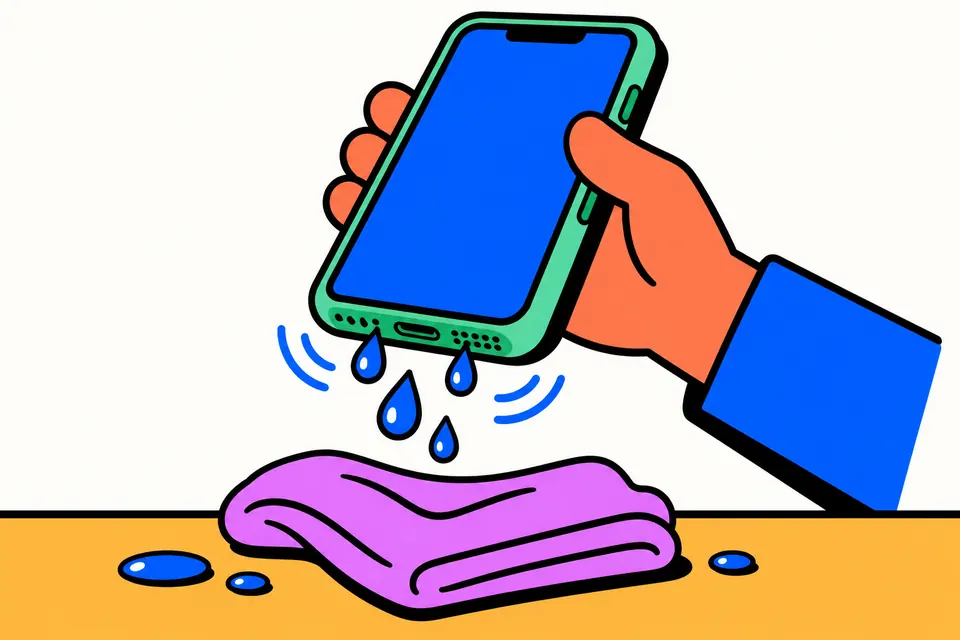
What a water eject sound does
When a phone falls in a bucket, gets caught in the rain or is rinsed under a tap, water often sits in the tiny holes of the speaker grille and in the gap in front of the speaker. Calls sound muffled, music crackles and the ringtone goes quiet. A water eject sound is a low tone, usually around 165 Hz, played through that speaker. Low notes make the speaker's thin cone move further than speech or music do, and that movement can push loose droplets out through the grille. It is the same idea Apple uses on its own watches, which play a tone to clear water from the speaker after a swim.
This page plays that tone in your browser. There is no app to install and nothing is uploaded: the sound is made on your phone by the browser's own audio engine. You choose the sound, the time and the speaker, and you can save the tone as a WAV file to play later without the internet.
Be realistic about it. A tone can help shake out droplets near the grille, which is often what makes a speaker sound muffled. It does not dry water inside the phone, it cannot fix corrosion, and it is not a repair. If the phone was under water for long, got wet with salt water or behaves oddly, switch it off and get it checked.
How to use the speaker cleaner
- Wipe the phone first. Dry the outside with a soft cloth and remove the case, so water can drain freely.
- Pick a sound. Steady tone plays one frequency (165 Hz by default, adjustable from 100 to 300 Hz). Sweep glides from 100 to 300 Hz and back every 4 seconds. Pulse switches the tone on and off about once a second.
- Choose how long: 15 seconds, 30 seconds, 1 minute or 2 minutes. 30 seconds is a good first run.
- Choose the speaker. Both works for most phones. Use Left only or Right only to target one speaker on phones with stereo sound.
- Hold the phone with the speaker facing down, so loosened water can drip out, and press Start sound. Raise the phone volume step by step from the middle.
- Wipe away the water that comes out, then run it once or twice more if the sound is still muffled.
- Check the result with Test left, Test right and Test both, which play a short chime on each side.
Which mode should you try?
| Mode | What it plays | When to use it |
|---|---|---|
| Steady tone | One low frequency, 165 Hz by default | First try for most phones and Bluetooth speakers |
| Sweep 100–300 Hz | Rises from 100 to 300 Hz and falls back, every 4 seconds | When the steady tone does not change much, since every speaker responds best at its own frequency |
| Pulse | The tone in short bursts with small pauses | To give the cone repeated pushes instead of one long hum |
Very high "speaker cleaner" frequencies such as 10,000 Hz or more are much less useful for this. High notes barely move the speaker cone, and they are harsh to listen to. Low tones are what make the cone travel.
First steps if your phone got wet
The tone is for the speaker. For the whole phone, follow the makers' own advice. Apple's support page on liquid in an iPhone says to tap the phone gently against your hand with the connector facing down, leave it in a dry area with some airflow, and wait at least 30 minutes before charging. Apple also says not to use an external heat source or compressed air, not to push cotton buds or paper towels into the connector, and not to put the phone in a bag of rice.
Samsung's page on water exposure on Galaxy devices says to turn a non-water-resistant phone off straight away, take out the SIM and memory card, wipe it with a dry cloth, keep it away from hair dryers and other heat, dry it in a cool, ventilated place out of direct sunlight, and have it inspected at a service centre. Samsung also notes that call quality can suffer until the microphone, speaker and receiver are completely dry.
Put together, the safe order is:
- Switch the phone off if it is not rated water-resistant. Remove the SIM tray and memory card.
- Wipe it dry, shake it gently with the ports facing down, and leave it in a cool, airy place.
- No hair dryer, oven, heater, direct sun, rice or cotton buds in the ports.
- Don't charge until the phone and the cable are fully dry.
- Once it is on and working, use the water eject sound to clear the speaker grille.
Tips and common mistakes
- Volume matters more than time. The page tone is at 50% by default. The real loudness comes from your phone's volume buttons. Go up gradually, and stop if the speaker rattles harshly.
- Protect your ears. Never play the tone through earbuds or headphones in your ears. For wet earbuds, take them out and play the tone with them lying on a cloth.
- Use the right speaker. Phones with stereo sound often use the earpiece at the top as one channel. Hold the phone sideways and try Left only and Right only.
- Silent mode on iPhone can mute web page sounds. Switch it off if you hear nothing.
- Bluetooth speakers can use the tone too, but check the speaker's own manual first if it is not rated water-resistant.
- Offline use: tap Download as WAV to save a 30-second file of the current sound and play it from any music player later.
More phone tests
After cleaning, check the rest of the phone. The mic test records a few seconds and plays them back so you can hear whether the microphone was affected. The vibration test checks the motor, and the touch screen test finds dead zones or ghost touches that sometimes appear after water gets near the display. For laptops, there is a keyboard test. You will find all of them on the phone and device tests page.
In Hindi
Frequently asked questions
Does a water eject sound really work?
It can help, but there is no guarantee. A low tone makes the speaker cone move a lot, and that movement can push small droplets out through the grille, which is why the sound often gets clearer after a few runs. It cannot dry water that is already inside the phone, and it does not repair damage.
Which frequency is used to eject water from a speaker?
Most water eject tones use about 165 Hz, which is the default here. You can change it between 100 and 300 Hz, or pick Sweep to glide through that whole range every 4 seconds. If one tone does little, try the sweep or the pulse mode.
Speaker se pani kaise nikale?
Phone ko is tarah pakdein ki speaker neeche ki taraf ho, Start sound dabayein aur volume dheere-dheere badhayein. 30 second se 1 minute chalayein, jo pani bahar aaye use kapde se ponchh lein, aur zaroorat ho to 1-2 baar dohrayein. Phone garam karne ya cotton bud daalne se bachein.
Phone me pani chala jaye to kya kare?
Agar phone water-resistant nahi hai to use turant band karein, SIM tray nikalein aur sookhe kapde se ponchh kar hawa wali thandi jagah sookhne dein. Hair dryer, dhoop ya chawal mein na rakhein, aur poora sookhne tak charge na karein. Phone theek na chale to authorised service centre le jayein.
Should I put my wet phone in rice?
No. Apple's support page on liquid in an iPhone says plainly not to put the phone in a bag of rice. Leave the phone in a dry place with some airflow instead, and don't use heat or compressed air.
Can the sound damage my speaker or my ears?
At sensible levels, a short low tone is ordinary audio for a phone speaker. Still, start at medium volume and raise it slowly, stop if the speaker rattles or buzzes harshly, keep the phone away from your ears, and never play it through earbuds or headphones that are in your ears.
Does it work on iPhone and Android?
Yes. The tone plays in any modern browser on iPhone, Android phones, tablets and laptops. On iPhone, silent mode can mute sound from web pages, so switch it off if you hear nothing.
Can I clean the earpiece or the top speaker too?
Use Left only and Right only. On many phones with stereo speakers, the earpiece at the top acts as one channel and the bottom speaker as the other, so holding the phone sideways and playing each channel lets you work on one at a time.