Bluetooth Thermal Printer Test (No App)
Connect to a Bluetooth receipt printer from your browser and print a test page in under a minute. Works in Chrome and Edge on Android, Windows, Mac and Chromebook, with nothing to install.
- 100% free
- No sign-up
- Runs in your browser
- Updated October 2026
1Your printer
58 mm rolls print 48 mm wide (384 dots), 80 mm rolls print 72 mm wide (576 dots), at 203 dpi.
Checking what this browser can connect to…
2What to print
Hindi, ₹ and any other text print correctly, because the whole slip is sent as an image.
3Print from other tools
These tools have a Print on thermal printer button that uses the same printer settings.
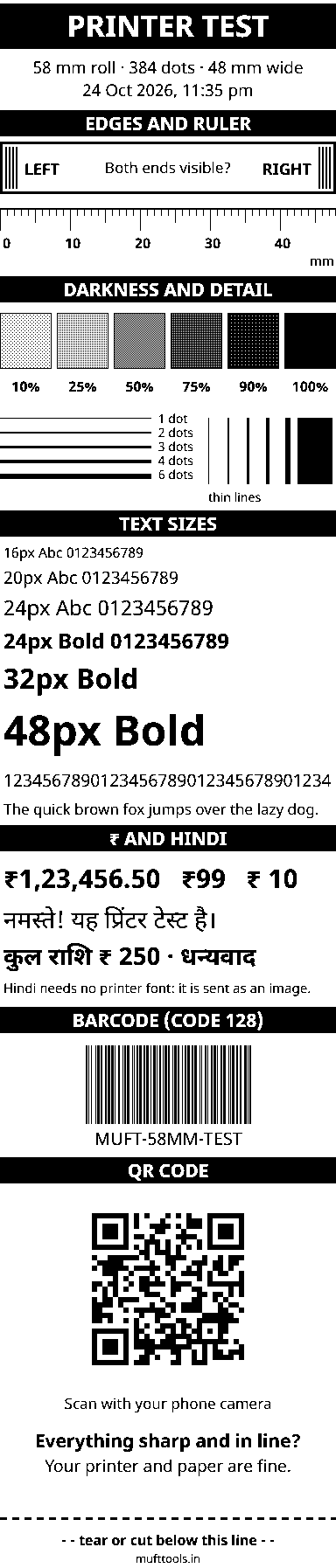
This preview shows the exact black dots your printer will get.
Nothing is installed and nothing is uploaded. Bluetooth and USB printing work in Chrome or Edge on Android, Windows, Mac and Chromebook. On iPhone, use the PDF with an AirPrint printer or your printer's app.
Print over Bluetooth straight from the browser
Most portable receipt printers sold in India connect over Bluetooth, and most come with a little-known app from the maker. If the app is missing, outdated or full of ads, testing the printer becomes a chore. Chrome and Edge can talk to Bluetooth printers themselves, so this page connects, sends a test page and tells you in plain words what went wrong if it fails. The print window opens with Bluetooth already chosen.
Two kinds of Bluetooth printers
Printers use one or both of two Bluetooth types, and the browser reaches them in different ways:
| Bluetooth Low Energy (BLE) | Classic Bluetooth (SPP) | |
|---|---|---|
| How to connect here | Choose Bluetooth and pick the printer from Chrome's list. No pairing. | Pair it first in phone or computer settings, then choose Paired Bluetooth / COM. |
| Browser feature | Web Bluetooth | Web Serial (newer Chrome and Edge versions) |
| Typical sign | Shows up in Chrome's list straight away | Asks for a PIN when pairing, often 0000 or 1234 |
Many printers offer both and may appear twice in your phone's Bluetooth list. Use whichever connects first. Web Bluetooth works in Chrome and Edge on Android, Windows, Mac and Chromebook, as described in MDN's Web Bluetooth guide. Reaching paired classic printers through Web Serial arrived later, first on computers and then on Android (Chrome's note on serial over Bluetooth), so keep Chrome updated.
Step by step on an Android phone
- Switch the printer on and load paper. Turn on Bluetooth on the phone.
- Open this page in Chrome, tap anywhere to see the preview, then tap Print test page.
- With Bluetooth selected, tap Print. Allow Chrome to use nearby devices or location if Android asks.
- Pick your printer in the list. Its name often contains words like Printer, MTP, PT or BT.
- Wait for "Sent to…" in the print window. A long test page can take several seconds over Bluetooth.
The next time you print during the same visit, the printer stays connected and printing starts at once. Your choice of method and paper width is remembered on this device.
If it does not work
- "No printer was chosen": the list was closed or empty. Switch the printer off and on and keep it close.
- "Does not offer a printer service we know": you picked something that is not a printer, or a printer that only works with its own app. Try Paired Bluetooth / COM instead.
- Prints garbage or stops halfway: tick Safe mode and charge the battery.
- Nothing happens at all: another app may hold the connection. Close the billing app and try again.
Chrome shows its own device list, and this page only receives the one printer you select. Nothing about your devices or your print is uploaded.
More thermal printer test pages
Need more options? Open the full Thermal Receipt Printer Test & Print.
Frequently asked questions
How do I connect a Bluetooth thermal printer to my phone without an app?
Open this page in Chrome or Edge on Android, tap Print test page, choose Bluetooth and tap Print. Pick the printer in the list Chrome shows. If it is not listed, pair it in Android's Bluetooth settings and choose Paired Bluetooth / COM instead.
Why does my Bluetooth printer not show in the list?
Either it is a classic Bluetooth printer, which needs pairing in settings first, or another app is still connected to it. Close billing apps that use the printer, switch it off and on, and keep it within a metre or two. Location and Bluetooth must also be allowed for Chrome on Android.
What is the PIN for pairing a Bluetooth thermal printer?
Many printers use 0000 or 1234. If neither works, check the printer's manual. Some printers also show it on their self-test page, which many models print when you hold the feed button while switching them on.
Does this work on iPhone?
No. Safari and every other iPhone browser lack Web Bluetooth, so no website can connect to a Bluetooth printer from an iPhone. Download the PDF and print it with the printer maker's app or AirPrint.
The test prints halfway and then stops. What can I do?
Tick Safe mode in the print window. It sends smaller pieces with short pauses, which suits printers with little memory or a weak Bluetooth chip. Also make sure the battery is charged.
Can the website see my other Bluetooth devices?
No. Chrome shows its own list and the site only gets the one device you pick, for this visit. You can forget it at any time with Forget printer in the print window.