80 mm Thermal Printer Test Page
A test page for 3-inch (80 mm) counter and kitchen printers, with a full-width edge check and a cutter test. Print it straight from Chrome or Edge, or download the 80 mm PDF.
- 100% free
- No sign-up
- Runs in your browser
- Updated October 2026
1Your printer
58 mm rolls print 48 mm wide (384 dots), 80 mm rolls print 72 mm wide (576 dots), at 203 dpi.
Checking what this browser can connect to…
2What to print
Hindi, ₹ and any other text print correctly, because the whole slip is sent as an image.
3Print from other tools
These tools have a Print on thermal printer button that uses the same printer settings.
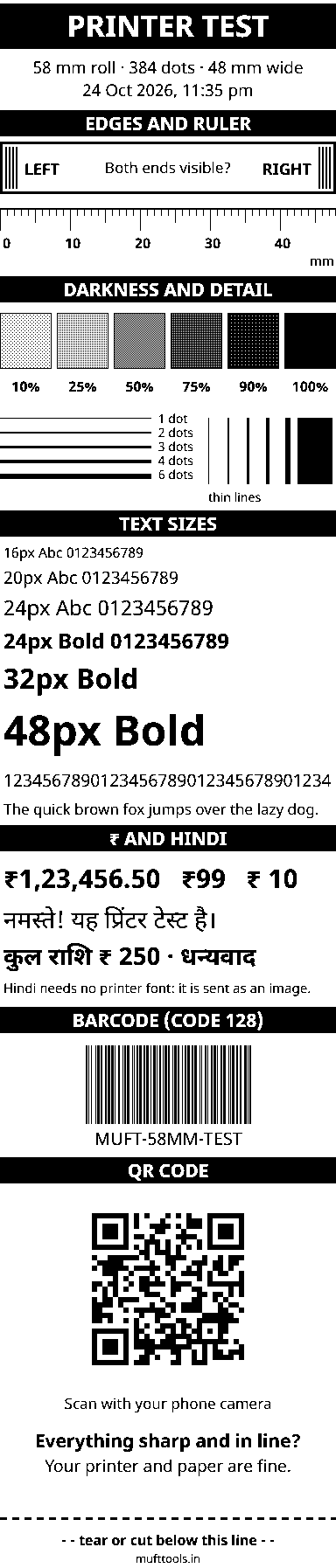
This preview shows the exact black dots your printer will get.
Nothing is installed and nothing is uploaded. Bluetooth and USB printing work in Chrome or Edge on Android, Windows, Mac and Chromebook. On iPhone, use the PDF with an AirPrint printer or your printer's app.
For counter, billing and kitchen printers
The 80 mm printer is the bigger, faster sibling of the portable 58 mm model. It is the box next to the billing computer in supermarkets, medical stores and restaurants, and the printer that spits out kitchen order tickets during a busy dinner. Most have an automatic cutter, a USB cable and often a LAN port, and a few add Bluetooth. This page opens the test page set to 80 mm, so the edge check, ruler and patches use the full 72 mm width.
Checks that matter on an 80 mm printer
| Check | Why it matters |
|---|---|
| Edge box, full width | Billing software often prints right up to the edge. If the RIGHT bar is missing, your printer may have a 512-dot (64 mm) head; long item names and totals would then be cut off. |
| Ruler to 72 mm | Confirms the printer is not scaling the page. A wrong driver paper size shrinks or stretches everything. |
| Darkness patches | Fast counter printers can print too light at high speed. If the 50% patch looks washed out, raise the darkness a step. |
| Barcode | Bills with a barcode or QR for returns and payment must scan at the counter scanner, not just on a phone. |
| Cut test | The cutter should cut below the dashed line without slicing through the text above it. |
Printing from a Windows billing computer
Most 80 mm printers in shops are connected to a Windows PC with the maker's driver installed. In that case choose Print dialog. In the dialog, pick the thermal printer, open More settings, choose the roll paper size from the printer's list (often named like "80 × 297 mm" or "Roll paper 80 mm"), set margins to None and scale to 100%, and switch off headers and footers. The test page then comes out at its true size, with no extra blank paper.
The direct USB option is meant for Android tablets and Chromebooks. On Windows the installed driver keeps the printer's USB connection to itself, and the browser cannot take it over. The print dialog is the right way there.
Kitchen printers and restaurant setups
A kitchen printer lives in heat and grease, which is hard on thermal paper and the print head. Print the test page at the start of the week: if the thin lines show gaps or the patches look streaky, clean the head before the evening rush. Keep rolls away from the stove, because heat darkens the whole roll. If one printer serves both the counter and the kitchen, the test page also confirms that the cutter is working before the first order of the day.
When the printer prints strange symbols
If a billing app prints rows of symbols but this test page prints cleanly, the printer itself is fine. The app is probably sending text in a code page or language mode the printer does not use. Check the app's printer model setting. Because this page sends a picture instead of text, it avoids that problem completely, which makes it a quick way to tell a printer fault from a software fault.
Once the test passes, the same printer can print payment receipts, rate lists and UPI QR slips from the other MuftTools pages, at the full 80 mm width.
More thermal printer test pages
Need more options? Open the full Thermal Receipt Printer Test & Print.
Frequently asked questions
What is the print width of an 80 mm thermal printer?
Usually 72 mm, which is 576 dots at 203 dpi. Some models print 64 mm (512 dots). The edge box on the test page shows which kind you have: if the RIGHT bar is missing, set Dots per line to 512 under More settings.
How many characters per line does an 80 mm printer print?
Typically 48 characters in its standard built-in font, or 42 on printers with a 512-dot head. Slips printed from this page are images, so the text size you choose decides how much fits.
How do I test the auto cutter?
Keep 'Cut the paper at the end' ticked in the print window and print the test page with Bluetooth, USB or Paired Bluetooth / COM. The printer should cut just below the dashed line at the bottom. Printers without a cutter ignore the command.
My 80 mm printer is on a Windows billing PC. How do I print the test page?
Use Print dialog. Choose the thermal printer, set the paper size to the 80 mm roll size in the printer's list, margins None and scale 100%. The driver on Windows keeps the USB port to itself, so direct USB printing from the browser usually does not work there.
Can I print an 80 mm test page from an Android tablet?
Yes. Connect the printer with a USB OTG cable and choose USB cable, or use Bluetooth if the printer has it. Chrome on Android asks for permission the first time.