58 mm Thermal Printer Test Page
A test page sized for 2-inch (58 mm) receipt printers, the small portable kind used for billing on phones. Print it over Bluetooth or USB from your browser, or download the 58 mm PDF.
- 100% free
- No sign-up
- Runs in your browser
- Updated October 2026
1Your printer
58 mm rolls print 48 mm wide (384 dots), 80 mm rolls print 72 mm wide (576 dots), at 203 dpi.
Checking what this browser can connect to…
2What to print
Hindi, ₹ and any other text print correctly, because the whole slip is sent as an image.
3Print from other tools
These tools have a Print on thermal printer button that uses the same printer settings.
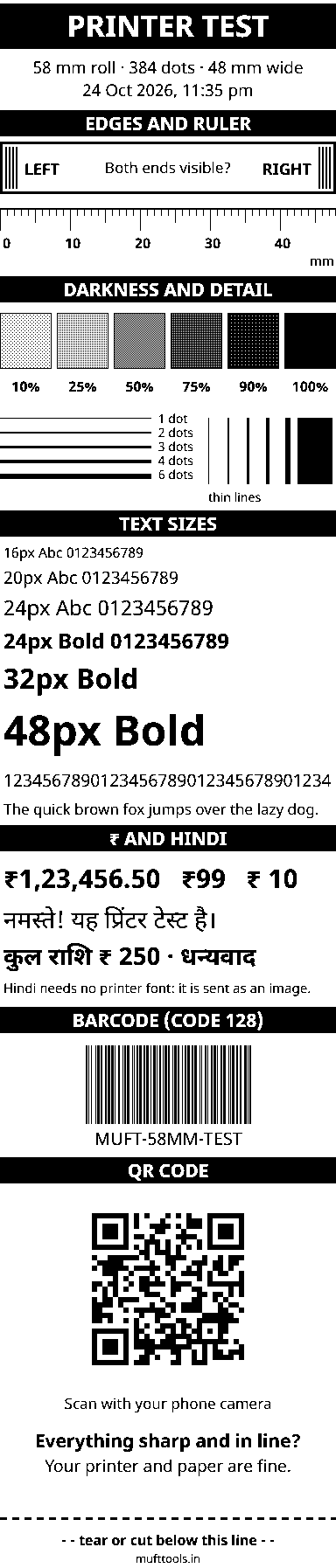
This preview shows the exact black dots your printer will get.
Nothing is installed and nothing is uploaded. Bluetooth and USB printing work in Chrome or Edge on Android, Windows, Mac and Chromebook. On iPhone, use the PDF with an AirPrint printer or your printer's app.
Testing a 2-inch receipt printer
The 58 mm printer is the workhorse of small Indian businesses. It sits next to the billing phone at a vegetable stall, travels with a delivery agent, prints tokens at a clinic and slips at a petrol pump. Most models are portable, run on a battery and talk to a phone over Bluetooth. Because they are cheap and come from many makers, their settings vary, and a quick test page tells you more than the box does.
This page opens the test page already set to 58 mm. Tap anywhere to see the live preview, then print it or download the PDF.
What a 58 mm test page should show
On a standard 2-inch printer the print head is 48 mm wide and holds 384 heating dots, 8 for every millimetre. The test page uses all of them. Look for these four things on the slip:
- The edge box: the thick LEFT and RIGHT bars both print. If one is missing, the printer has fewer dots than 384.
- The ruler: it reaches 40 and a little beyond, about 48 mm in all. Hold a steel ruler against it: the marks should match within half a millimetre.
- The grey patches: 10% should be faint and 90% nearly black. Small printers running on a weak battery often print pale; charge it and try again before changing the darkness.
- The QR code: scan it with your phone camera. If a 58 mm printer can print a QR code that scans, it can print a UPI QR slip too.
Bluetooth or cable?
Most 58 mm portable printers offer Bluetooth, and many offer two kinds at once: Bluetooth Low Energy, which shows up straight away when you choose Bluetooth in the print window, and classic Bluetooth, which you pair first in your phone's settings and then pick under Paired Bluetooth / COM. If the printer appears twice in your phone's list with slightly different names, that is the reason. Either works; use the one that connects without errors.
Desktop 58 mm printers usually come with a USB cable. On a Windows computer, install the maker's driver and use the print dialog with the paper size set to 58 mm. On an Android tablet, a USB OTG cable lets Chrome print to it directly.
Paper and battery tips for small printers
- Buy rolls that fit the bay. Portable printers take only small rolls. Check the largest roll diameter in the manual: a big roll meant for a counter printer may not let the lid close.
- Charge before long jobs. A long rate list or a stack of receipts can drain a nearly empty battery mid-print, which shows up as faded or skipped lines.
- Keep the head clean. Paper dust builds up quickly in bags and pockets. Wipe the print head gently with isopropyl alcohol once a month.
- Keep a PDF copy. Thermal prints fade with time, heat and sunlight, so keep a PDF or photo of any bill you may need later.
Next: print something useful
When the test page looks right, print a UPI "Scan & Pay" slip, a receipt or a price list on the same roll. Each of those tools has a Print on thermal printer button that remembers that you use 58 mm paper and how you connect.
More thermal printer test pages
Need more options? Open the full Thermal Receipt Printer Test & Print.
Frequently asked questions
What is the print width of a 58 mm thermal printer?
About 48 mm. At the usual 203 dpi that is 384 dots across. The rest of the 58 mm roll is the margin the printer leaves on both sides.
How many characters fit on one line of 58 mm paper?
In the printer's built-in font usually 32 characters per line, or about 42 in its smaller font. Text printed from this page is sent as an image, so the number depends on the text size you choose.
My 58 mm printer cuts off the right edge. What should I change?
Some 58 mm printers have 360 dots per line instead of 384. Open More settings in the print window, set Dots per line to 360 and print the test page again. Both the LEFT and RIGHT bars should now print.
Can I print the 58 mm test page from a phone?
Yes. In Chrome or Edge on Android, tap Print test page and choose Bluetooth or Paired Bluetooth / COM. On an iPhone, download the PDF and print it from the printer's app or with AirPrint.
Is 58 mm paper the same as 57 mm paper?
Yes, for practical purposes. Rolls sold as 57 mm and 58 mm both fit 2-inch printers. What matters more is the roll's outer diameter, which must fit the printer's paper bay.