UPI QR Code Scanner Online
Read any UPI QR code from a screenshot, photo or your camera and see who it pays, the UPI ID, any fixed amount and any AutoPay details, before you open a payment app.
- 100% free
- No sign-up
- Runs in your browser
- Updated October 2026
Point your camera at a QR code. Nothing opens until you choose to.
Works with UPI payment codes, website links, Wi-Fi, contact cards (vCard), phone numbers and plain text. We never open a link or start a payment by ourselves.
Result
- You never need to scan a QR or enter your UPI PIN to receive money.
- Your UPI app shows the payee's name from the bank before you pay. Check that it matches the shop or person.
- Be wary of codes pasted over a shop's stand, sent on WhatsApp, or that promise a refund, prize, cashback or job.
Source: RBI's BE(A)WARE booklet on common frauds.
Recent scans
No scans yet. Your scans stay in this browser only.
Read a UPI QR code without paying it
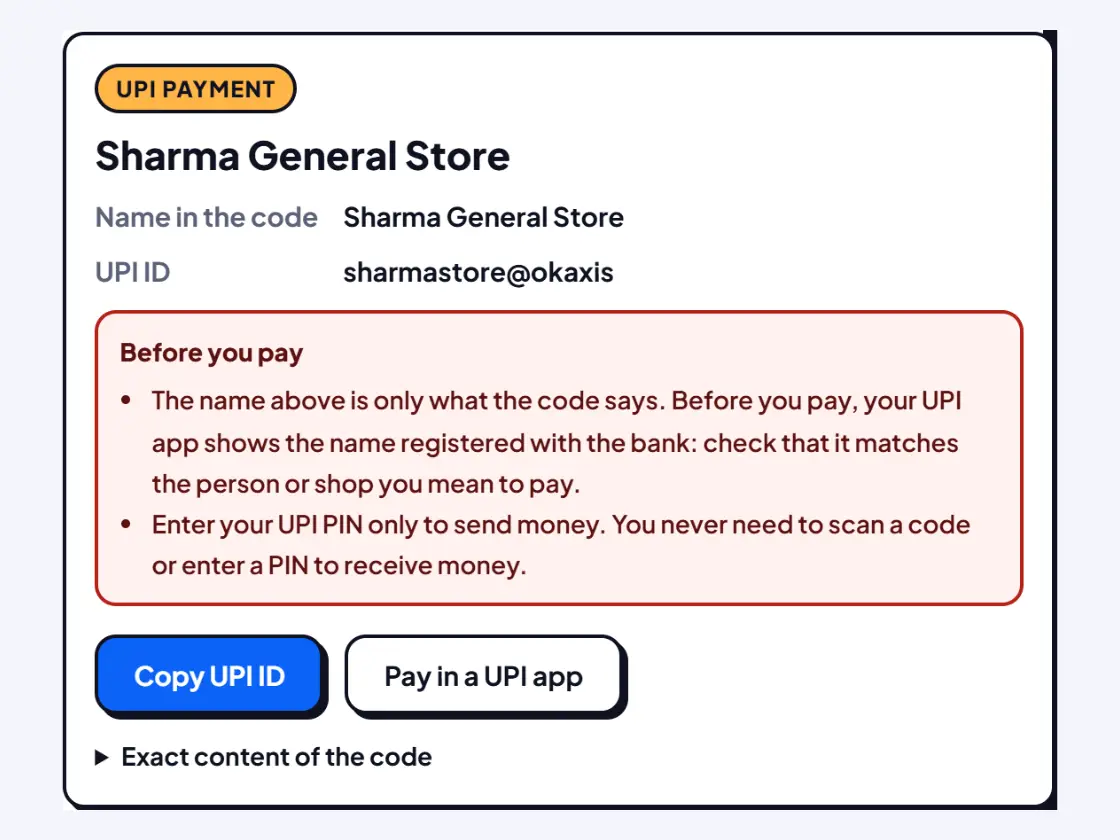
When you scan a UPI QR code inside a payment app, the app jumps straight to the payment screen. Sometimes you only want to know what the code says: whose UPI ID it is, whether it asks for a fixed amount, or whether a QR someone sent you on WhatsApp is genuine. This page reads the code and shows its contents as plain text, from a screenshot, a saved photo or the camera. It never starts a payment.
What you see for a UPI code
| Field | Where it comes from | What to check |
|---|---|---|
| Name in the code | The pn part, typed by whoever made the code | Treat it as a label only. Your UPI app shows the bank-registered name before you pay. |
| UPI ID | The pa part, the address money goes to | Compare with the ID the shop or person gave you. |
| Amount | The am part, if present | Pay only if you agreed to exactly this amount. |
| Note and reference | The tn and tr parts | Bills and payment gateways often add an order or invoice number. |
| AutoPay details | Mandate parts such as a repeat period or end date | Repeated debits: approve only a subscription you started. |
The full text of the code is always available under Exact content of the code, so you can see every part, including ones we do not explain.
Typical uses
- A QR sent on WhatsApp: screenshot it and open it here on the same phone to see the UPI ID before paying a seller, tutor or landlord.
- Paying from a laptop: read the code, copy the UPI ID and pay by typing it in your UPI app.
- Shop owners: scan your own counter QR from time to time and confirm the UPI ID is still yours, since stickers pasted over genuine codes are a known trick.
- Accounts staff: check the payee on a QR printed on a vendor's invoice before the payment run.
A reminder that comes with every UPI code
Each UPI result carries a red card with the rule from RBI's BE(A)WARE booklet: you never need to scan a QR or enter your UPI PIN to receive money. The booklet describes fraudsters who pose as buyers and ask sellers to approve a "request money" with their UPI PIN, and others who trick people into scanning QR codes that take money from their account. If someone sends you a code "to receive" money, do not scan it in your UPI app at all.
The scanner also adds automatic (heuristic) warnings when the payee name or note uses bait words such as refund, cashback, prize or KYC, or when a bank's name is mixed with words like customer care. These are guesses meant to make you pause; a clean result is not proof that a code is safe.
Private by design
The screenshot or photo is read on your device and never uploaded. Recent scans stay in this browser so you can find them again, and you can clear them with one tap. This is an independent tool, not linked to NPCI, any bank or any UPI app.
More QR scanner pages
Need more options? Open the full QR Code Scanner Online (Camera & Image).
Frequently asked questions
How do I find the UPI ID from a QR code?
Open the Image or screenshot tab and choose the QR picture, or paste a screenshot with Ctrl+V. The scanner shows the UPI ID, the name written in the code and any amount. Tap Copy UPI ID to pay by typing it instead of scanning.
Can I scan a UPI QR code that is on my own phone screen?
Yes. Take a screenshot of the QR (for example from WhatsApp) and choose it in the Image tab. That is easier than pointing another phone at your screen.
Why does my UPI app show a different name from the QR?
The name inside a QR code is typed by whoever made it and can be anything. Your UPI app shows the name registered with the bank account. If they differ a lot, ask the person before paying.
What does 'fixed amount' or 'AutoPay' mean in a UPI code?
A fixed amount means the code asks your app for exactly that sum. AutoPay (mandate) details mean approving it can allow future or repeated debits. Approve those only for a subscription you chose yourself.
Can scanning a UPI QR code take money from my account?
Not by itself. Money moves only when you approve a payment with your UPI PIN. That is why you should never enter your PIN for a code that someone says will pay you.