QR Code Scam Checker
Scan a QR code with your camera or from a screenshot and see what it really does before you pay or tap. UPI codes get a clear warning, and links are checked for common tricks.
- 100% free
- No sign-up
- Runs in your browser
- Updated October 2026
Point your camera at a QR code. Nothing opens until you choose to.
Works with UPI payment codes, website links, Wi-Fi, contact cards (vCard), phone numbers and plain text. We never open a link or start a payment by ourselves.
Result
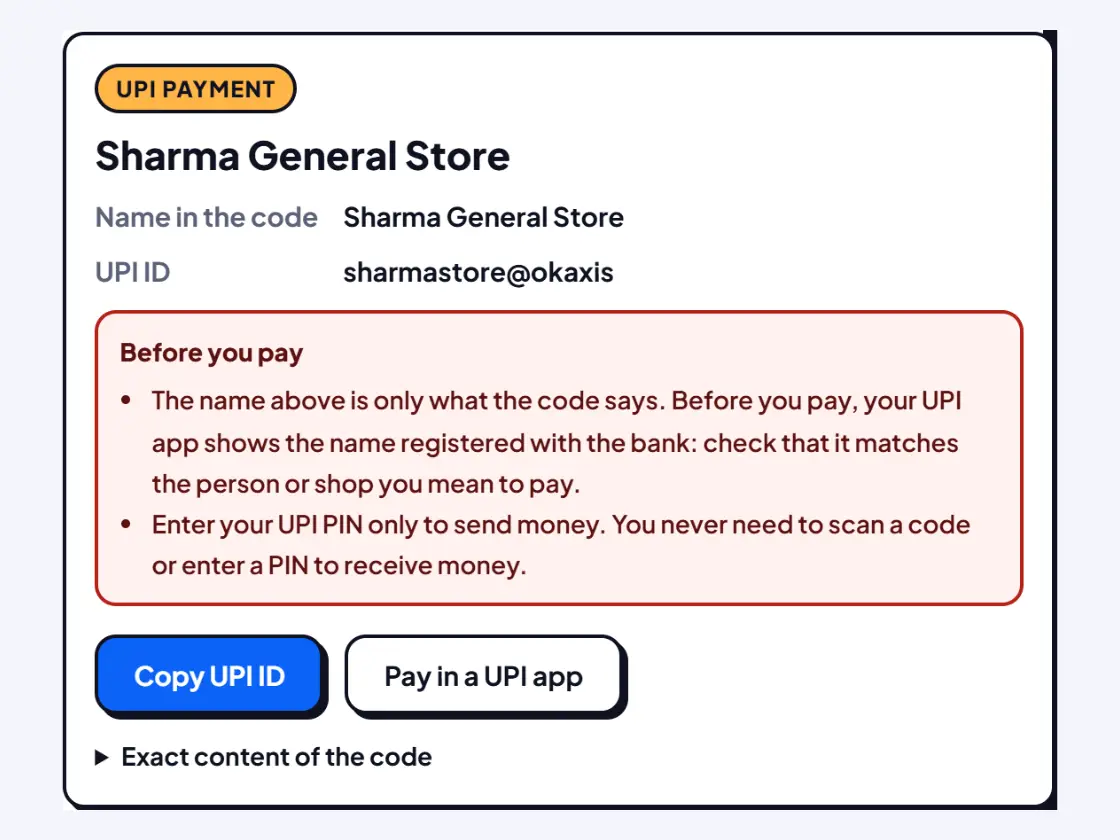
- You never need to scan a QR or enter your UPI PIN to receive money.
- Your UPI app shows the payee's name from the bank before you pay. Check that it matches the shop or person.
- Be wary of codes pasted over a shop's stand, sent on WhatsApp, or that promise a refund, prize, cashback or job.
Source: RBI's BE(A)WARE booklet on common frauds.
Recent scans
No scans yet. Your scans stay in this browser only.
Check a QR code before it checks your bank balance
A QR code is just a short piece of text printed as a pattern. That text can be a UPI payment request, a website, a Wi-Fi password or an app download, and you cannot tell which by looking at it. Phone cameras often act on it immediately. This checker does the opposite: it reads the code, shows you exactly what is inside in plain words, and points out the tricks fraudsters use. Nothing opens until you tap a button yourself.
The most common QR code scams in India
| Scam | How it works | What the checker shows |
|---|---|---|
| "Scan to receive money" | A fake buyer on a selling site sends a QR and says scanning it will pay you. Scanning and entering your PIN sends your money to them. | A red card: a UPI code is for paying, and the amount it would take from you |
| Refund, prize or KYC payee | The payee name in the code says "Refund", "Cashback" or a bank's "Customer Care" | The payee name, plus a heuristic warning about bait words and bank names |
| AutoPay mandate | A code that sets up repeated debits instead of a single payment | A warning that the code carries mandate or collect details |
| Sticker over a shop's QR | A fraudster's code pasted on top of the real one | The UPI ID and name in the code, to compare with the shop |
| Fake bank or delivery site | The code opens a page that looks like a bank, courier or government site | The real domain in large letters, look-alike and short-link warnings |
| App download | The code installs an .apk file that can read your messages and OTPs | An app-download warning |
The one rule to remember
RBI's booklet on common frauds, BE(A)WARE, puts it plainly: "Never scan any QR code to receive money. Transactions involving receipt of money do not require scanning barcodes / QR codes or entering mobile banking PIN (m-PIN), passwords, etc." The same booklet adds that if an app asks for your PIN to complete a transaction, you are sending money, not receiving it. Every UPI code you scan here shows that reminder.
How the link checks work
For website links the checker looks at the address, not the words around the code. It flags short links and QR redirect services that hide the real site, addresses that mention a bank, UPI app or company but are not on its official domain, letters swapped for numbers, special characters that imitate a known name, bare number addresses, links without https and .apk downloads. Indian banks are moving to .bank.in addresses, which only banks can register, under an RBI circular of April 2025.
These checks are heuristics: automatic guesses based on patterns. They catch many fakes, but a new scam site with an ordinary name can pass, and once in a while a genuine site gets flagged. Treat a warning as a reason to stop, and a clean result as "no obvious problem", not as proof.
If you have already paid or shared details
- Call the national cyber crime helpline 1930 or report at cybercrime.gov.in straight away. Quick reports give the best chance of stopping the money.
- Call your bank on the number printed on your card or passbook to block further debits.
- Change your UPI PIN and any password you typed on the site.
Everything on this page runs on your device. The camera picture and screenshots are not uploaded.
More QR scanner pages
Need more options? Open the full QR Code Scanner Online (Camera & Image).
Frequently asked questions
How can I check if a QR code is safe?
Scan it here with the camera or upload a screenshot. The checker shows the exact content as text without opening anything: the UPI ID and amount for payment codes, or the real website for links. It warns about short links, look-alike bank names, app downloads and payment codes that pretend to give you money.
Can someone steal money if I just scan a QR code?
Scanning alone does not move money. A UPI payment needs you to approve it with your UPI PIN in your app. The danger is being tricked into entering the PIN, or opening a fake website or app download from the code.
Someone sent me a QR code to receive money. Is it a scam?
Almost certainly. You never need to scan a QR or enter your UPI PIN to receive money. RBI's BE(A)WARE booklet says: "Never scan any QR code to receive money." Ask the buyer to send the money to your UPI ID instead.
Does a clean result mean the QR code is safe?
No. The checks are automatic guesses that catch common tricks. A new fake site with an ordinary name can pass them. If a code asks you to log in, pay, update KYC or share an OTP, open the official app or website yourself instead.
Where do I report a QR code fraud in India?
Call the national cyber crime helpline 1930 or report it at cybercrime.gov.in as soon as possible, and inform your bank to block further debits.
Is my scan uploaded anywhere?
No. The camera image and screenshot are read on your phone or computer. Your recent scans are kept only in this browser, and you can clear them at any time.