Kerala PSC Photo with Name and Date
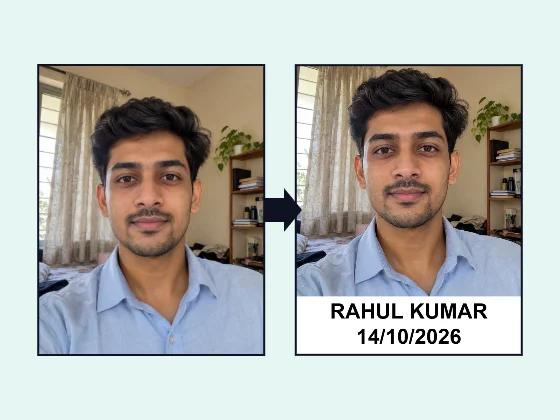
Kerala PSC wants your name and the date the photo was taken printed at the bottom, in a 150 × 200 px JPG of up to 30 KB. Set it all here in a minute, right on your phone.
- 100% free
- No sign-up
- Runs in your browser
- Updated October 2026
1Exam and photo size
2Upload your photo
Drag the preview to move the photo. Pinch, scroll or use Zoom so your face fills most of the photo area.
3Name and date
Layout
4Preview and download
Nothing is uploaded. Add a name and date only when your exam's notice asks for it, write the name as it is in your application, and use the date the photo was actually taken.
What Kerala PSC asks for
Kerala PSC uses One Time Registration: you create a profile once, upload a photo and signature, and apply for posts from that profile. The photo rules are printed in its notifications. The notification for the departmental examination dated 25/04/2025 sets them out in one paragraph:
- 200 pixels high and 150 pixels wide, not more than 30 KB, JPG;
- the name of the candidate and the date of taking the photo printed at the bottom;
- no cap or goggles, except those worn for religious custom;
- face and shoulders clear, white or light background, face in the centre, eyes open.
Recruitment notifications from December 2025 (for example Category No. 564/2025) repeat that new profiles need a photo taken within six months, that the name and the date of the photo should be printed legibly at the bottom, and that an accepted photo stays valid for 10 years from the date of upload.
This page opens the tool with the Kerala PSC size already set: 150 × 200 px, up to 30 KB, with a white strip for your name and date at the bottom.
Making the photo, step by step
- Take a new photo in daylight against a plain white or light wall, looking straight at the camera, with your face and shoulders in the frame.
- Upload it and drag or zoom so your face sits in the middle of the area above the strip.
- Type your name as in your profile. Capital letters read best at this small size.
- Set the date the photo was taken in the format you prefer; DD/MM/YYYY is the usual choice.
- Download and check the result box: it should read 150 × 200 px and below 30 KB.
Making the text readable at 150 × 200
A Kerala PSC photo is tiny: the whole strip is only about 40 pixels tall. To keep the name and date legible after the portal shows it on your profile and admission ticket:
- keep bold on and use the Arial-style font, which stays clearer than Times at small sizes;
- use two lines (name above date) for long names, so each line can be bigger;
- raise the strip to 22–25% if the letters look cramped, and zoom the photo in a little to keep your face large;
- avoid "Photo taken on" before the date at this size; it makes the date line much smaller.
Background and file size
If your wall is not plain, change the background to white first with the photo background changer, download it full size, then bring it here. The 30 KB limit is easy to meet at 150 × 200 px: the tool uses the highest JPG quality that fits, usually well under the limit.
The signature for your profile has its own size in the notice; for that, use the custom size in our exam photo and signature resizer. MuftTools is not affiliated with the Kerala Public Service Commission. Read the notification for your post before you upload, as details can change.
Other exam pages
Need more options? Open the full Photo with Name and Date for Exam Forms.
Frequently asked questions
What is the Kerala PSC photo size?
Kerala PSC's notification of 25/04/2025 says the photo should be 200 pixels high and 150 pixels wide, not more than 30 KB, in JPG format. The face and shoulders should be clear, on a white or light background.
Is the name and date compulsory on the Kerala PSC photo?
Yes. The notice says the name of the candidate and the date the photo was taken should be printed at the bottom of the photo. Recruitment notices of December 2025 repeat that they should be printed legibly at the bottom.
How old can my Kerala PSC photo be?
The December 2025 notices say candidates creating a new profile must upload a photo taken within six months. A photo uploaded and accepted is valid for 10 years from the date of uploading. Older notices also set a 'taken after' date, so check the notice you are applying under.
Can I add the name in Malayalam?
The tool uses standard fonts, and the notice does not say which language to use. Writing it in English, the way it appears in your profile, is the safe choice. If you type Malayalam, check that it shows correctly in the preview before downloading.
The name does not fit in 150 pixels. What can I do?
The tool shrinks the text to fit automatically. For long names, choose 'Name above date' rather than one line, keep bold on and raise the strip height to about 25% so the letters stay readable.