HSSC CET Photo with Name and Date
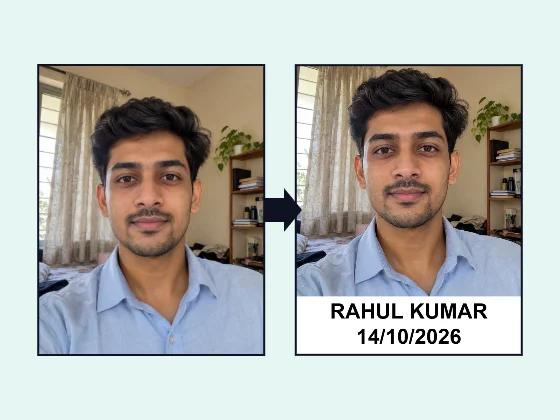
HSSC's CET Group C advertisements ask for a latest coloured photo with a white background and your name and the date clearly written on it. Make it here, then set the KB to match the upload page.
- 100% free
- No sign-up
- Runs in your browser
- Updated October 2026
1Exam and photo size
2Upload your photo
Drag the preview to move the photo. Pinch, scroll or use Zoom so your face fills most of the photo area.
3Name and date
Layout
4Preview and download
Nothing is uploaded. Add a name and date only when your exam's notice asks for it, write the name as it is in your application, and use the date the photo was actually taken.
What the 2026 HSSC advertisements say
The Haryana Staff Selection Commission recruits Group C posts through the Common Eligibility Test (CET). Its advertisements 02/2026, 03/2026 and 04/2026, for CET Phase-II Group C posts, include a table of documents candidates must upload. For every category, the second item is the same:
"Latest Scanned colored photograph with white background clearly mentioned date and name of the candidate on the photograph."
That gives four checks for your photo: it should be recent, in colour, on a white background, and show your name and the date clearly. The advertisements do not state a pixel size or KB limit for it, so this page sets a standard 350 × 450 px shape and leaves the KB empty for you to fill from the portal's upload page.
Make it in five steps
- Get a white background. Stand against a plain white wall in daylight. If your wall is cream, grey or busy, make the background white first with the photo background changer and download it full size.
- Upload the photo here and drag or zoom so your face fills most of the area above the strip.
- Type your name exactly as in your registration.
- Set the date the photo was taken and pick the format. DD/MM/YYYY is a safe choice.
- Enter the KB limit from the upload page in the Max KB box (and Min KB if one is shown), then download the JPG.
Why "clearly" matters
The advertisement says the name and date must be clearly mentioned. A handwritten date on a printed photo, scanned at an angle, is often hard to read once the portal shrinks it. Printed text in a white strip stays sharp. Keep bold on, use two lines (name above date), and keep the strip at 18–25% of the height so the letters are large enough.
If the portal shows a different size
Online forms sometimes show their own limits on the upload button, for example a maximum KB or a pixel range. Those limits apply to your file even though the advertisement does not mention them. Choose Custom size in the size list to enter exact pixels, or keep 350 × 450 px and only fill in the KB range; the tool will keep the name and date readable at any size.
Checklist before you upload
- Colour photo, not black and white.
- White background with no shadow or objects behind you.
- Your name spelled as in the application.
- The real date the photo was taken.
- File size inside the limit shown on the portal.
Other documents in the same table, such as certificates and your Aadhaar card, are scans rather than photos; our JPG to PDF converter helps if the portal wants them as PDF. MuftTools is not affiliated with HSSC. Read the advertisement and portal instructions for your post, since later notices can change the requirements.
Other exam pages
Need more options? Open the full Photo with Name and Date for Exam Forms.
Frequently asked questions
Does HSSC need the name and date on the photo?
Yes. HSSC's CET Group C advertisements 02/2026, 03/2026 and 04/2026 list among the documents a 'latest scanned colored photograph with white background clearly mentioned date and name of the candidate on the photograph'.
What is the HSSC photo size in KB?
The advertisements we read do not give a pixel size or KB limit for the photo. The tool uses 350 × 450 px as a default. Enter the KB limit shown on the upload page of the portal in the Max KB box, and the tool will save the file under it.
Which date should be on the photo?
The date the photo was taken. The advertisement asks for a latest photograph, so take a fresh one rather than reusing an old photo with a new date.
My photo does not have a white background. What should I do?
Take a new photo against a plain white wall, or change the background to white with our photo background changer, download it full size, and then add the name and date here.
Is my photo uploaded to MuftTools?
No. The photo is cropped and the text is added inside your browser. Nothing is sent to a server.