Change Photo Background to White
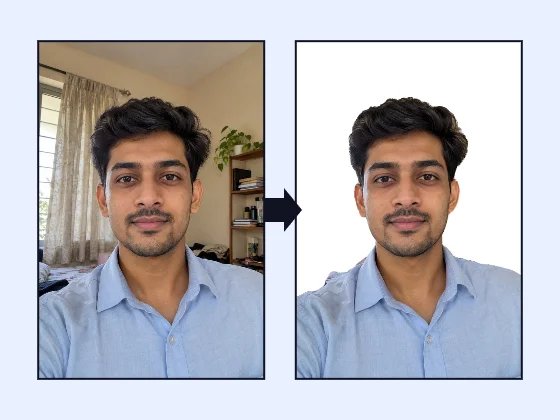
Turn a cupboard, curtain or cream wall behind you into clean white for a form photo. Your photo stays on your phone, and you can save it at the exam's exact size.
- 100% free
- No sign-up
- Runs in your browser
- Updated October 2026
1Upload a photo of a person
This works on photos of people: one person, head and shoulders or half body, facing the camera. It is not made for products, pets or objects.
2New background
BackgroundIf a thin line of the old wall shows around your hair or shoulders, move it right. If hair looks cut, move it left.
3Output
Same size as your photo, up to 3000 px on the long side.
Drag the preview to move the photo, and pinch or scroll to zoom.
4Preview and download
Nothing is uploaded. The person-detection model (about 1.2 MB) downloads to your browser the first time and runs on your device. Some portals, such as passport offices, ask for a photo that has not been edited by software: for those, take a fresh photo against a real plain white wall.
Why so many forms want a white background
A plain white or light background lets the face stand out, prints cleanly on admit cards and ID cards, and makes it easy to compare the photo with the person at an exam centre. That is why notices from bodies such as UPSC (plain white), NTA for NEET (white) and IBPS (light, preferably white) mention it. A photo taken in a bedroom or office rarely has a clean white wall behind it, and a cream or grey wall can look dull and patchy once the portal shrinks it to 20 or 50 KB.
This page opens the background changer with white already selected. Upload your photo and the room behind you is replaced with white, while your face, hair and clothes stay exactly as the camera took them.
Three-step white background
- Upload a front-facing photo with your whole head and shoulders in it. The person-detection model downloads once and finds you in a few seconds.
- Check the hair line. White shows every leftover of the old wall. If you see a thin grey or brown halo, move the Edge slider slightly to the right.
- Save it the way your form wants. Use Full size for printing or for a portal that only asks for a clear photo. Use Exam / form size for exams: pick the preset, or type the pixels and KB from your notice.
White, off-white or light grey?
Pure white (#FFFFFF) is the safest choice when a notice says "white background". Off-white is a very light grey that some photographers prefer, because it keeps a soft separation from a fair face or a white shirt. If your notice says "light background", either works. Avoid tinted or patterned backgrounds unless you are asked for them.
Get the lighting right first
The model only replaces the background; it does not fix the lighting on your face. Shadows under the eyes, a bright window behind you or a yellow bulb will still show on a white background, and they show more than they did on a busy wall. Face a window in daylight, keep the phone at eye level, and switch off yellow overhead lights. A good photo with a messy background becomes a good form photo here; a dark photo stays dark.
When to skip the edit
Some offices want the photo exactly as it came out of the camera. The US State Department, for one, rejects passport and visa photos changed with software. For Indian passports the photo is normally taken at the Passport Seva Kendra. If you are asked for an unedited photo, stand against a real white wall instead; our passport size photo maker then crops and prints it.
After the background
If your exam also wants your name and the date on the photo, as Kerala PSC and HSSC CET notices do, save the white-background photo full size and open it in the photo with name and date tool. For a signature, use the exam photo and signature resizer.
Other background colours
Need more options? Open the full Photo Background Changer (White & Blue).
Frequently asked questions
How do I make my photo background white on a phone?
Open this page on your phone and upload the photo. White is already selected, so the background turns white as soon as the tool finds you. Download it full size, or switch to Exam / form size to save it at the pixel size and KB your form needs.
Should I choose white or off-white?
Choose what your notice says. Most Indian exam notices ask for white or a light background. Off-white is useful when pure white makes a fair face or a white shirt blend into the background.
My white shirt disappears into the background. What can I do?
The tool keeps your shirt, but on pure white the edge can be hard to see. Pick Off-white or Light blue if the notice allows it, or wear a darker top for the photo.
Is a software-made white background accepted everywhere?
No. Most exam portals only check that the background is plain and light, but some offices, such as the US State Department for passports and visas, reject photos changed by software. If you are told to submit an unedited photo, take a new one against a real white wall.
Is my photo uploaded?
No. The background is replaced inside your browser by a small model that runs on your device. Nothing is sent to a server.